
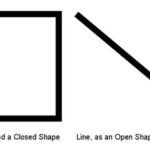
We have already explained the basics of outlines in PowerPoint 2007 and changing weight and dash types. In this tutorial, we’ll learn about adding arrowheads to lines. First things first: arrowheads can only be added to lines within open shapes. Shapes, such as rectangles, circles, etc. are closed shapes. Regular line Shapes, such as straight lines, curves, scribbles, etc., are open shapes.

Learn how to format arrowheads for line shapes in PowerPoint 2007 for Windows.
Related Posts
 We have already showed you the different outline attributes in PowerPoint 2007. In this tutorial, the outline options series will conclude with this a...
 We have already covered fills in PowerPoint 2007 and later versions. In the next part of this series of tutorials, we are going to learn about the out...
 In a previous tutorial, we explained the basics of formatting outline in PowerPoint 2007 using the Shape Outline gallery. You can explore more advance...
 After learning how to format shape outlines in PowerPoint 2007, apply weight and dash styles, arrowheads add gradients to outlines, you are now ready ...