
PowerPoint 2013’s Presenter View is one of its most revamped features — but first let us discuss what Presenter View actually is. It’s a special view that accompanies Slide Show view and is typically used in a two display environment such as a laptop and a projector. The projector then shows the actual slides — that’s what we commonly call Slide Show view. While Presenter view in PowerPoint 2010 and earlier versions had to be turned on, PowerPoint 2013 automatically detects if you have two displays and turns on Presenter view.
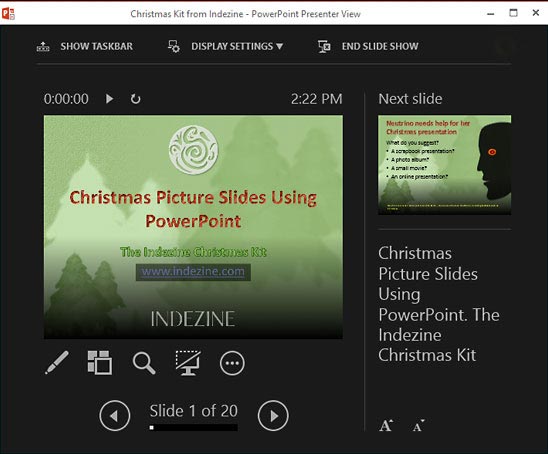
Learn about PowerPoint 2013’s enhanced presenter view.
Related Posts
 Microsoft Office 2013 for Windows was released on October 11, 2012. It is the successor of the previous version, Office 2010, and among the most used ...
 Do you want to add an infinity symbol on your slide? Or do you want to add one of the mathematical symbols? Or even the Yen or Rupee symbols? PowerPoi...
 Text is an important element in your PowerPoint slides, and most of the time, text alignment is taken care by the defaults set in your presentation te...
 While you can open and save files from any file location you access on your computer or network, you can also add more places from where you can open ...