
When PowerPoint is launched, it opens with an empty presentation of just one slide. This one slide typically has placeholders for a title and a subtitle — and any text you type shows up in black over a white slide background. Why do you have to live with these defaults? Can you change this blank presentation so that you get a slide that’s part of your custom PowerPoint template or Theme? Or even any of the other templates / Themes built within PowerPoint?
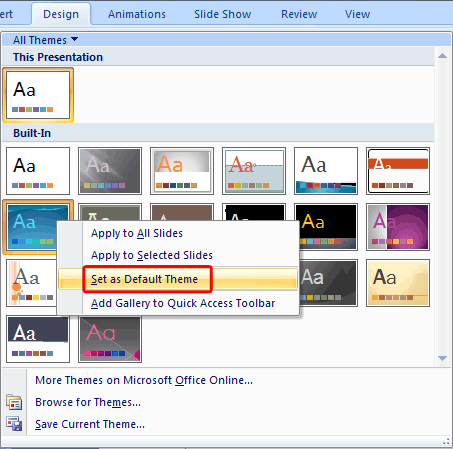
Learn how to change the default template or Theme in PowerPoint 2007 for Windows.
Related Posts
 Applying Theme Colors and Theme Fonts in PowerPoint gives you a quick, precise way to refresh your presentation’s look without committing to a full th...
 Think of a PowerPoint slide as your digital stage. Sure, you could leave it bare—like performing Shakespeare in a vacant parking lot—but most folks pr...
 In previous tutorials, we have explained the formatting of shape outlines in PowerPoint 2007 and changing the weight of shape outlines. In this tutori...
 At times, you may want to change your default version of PowerPoint. This decision can be important for you if you have multiple versions of PowerPoin...