
When you create a new table in PowerPoint, you’ll see some sort of default formatting applied to it. Most probably, you’ll find that the table already has Banded rows and the Header row highlighted. While PowerPoint decides to turn on some of these Table Style Options, there are some that you can manually enable. All put together, you can play with 6 distinct Table Style Options that let you control the way through which table rows and/or columns can be made to stand apart.
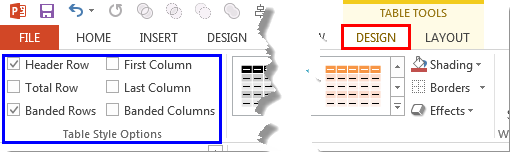
Learn about Table Style Options in PowerPoint 2013 for Windows.
Related Posts
 In PowerPoint, animating table components is not possible unless you ungroup the table. Once your table is ungrouped, you can animate the ungrouped ta...
 Animating table components is something that you cannot do in PowerPoint. You can either set to animate the entire table at a time, or can't animate i...
 Tables are essentially a group of cells arranged in a proper way. So typically you would expect that ungrouping a table into individual cells should b...
 Table borders in PowerPoint are usually thin, possessing just 1pt. weight (thickness) -- that's not as thin as a human hair, but still quite thin. Mos...