
 (No Ratings Yet)
 Loading...
SmartArt is a great new feature that Microsoft added in PowerPoint — yet many users want to convert their SmartArt graphic to bulleted text, or even to individually editable shapes that can be manipulated further. Yes, you can convert SmartArt to individual shapes, but do remember that this is a one-way process, and you lose any editability for the SmartArt graphic from that point of time. However, converting to shapes does mean that you have complete control over moving, resizing, deleting, or formatting individual shapes. Follow these steps to convert a SmartArt graphic into shapes in PowerPoint 2013 for Windows.
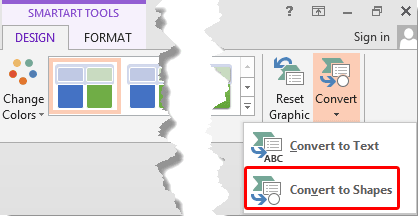
Learn how to convert a SmartArt graphic to shapes in PowerPoint 2013 for Windows.
Related Posts
 Once you have inserted an organization chart (org chart) within PowerPoint 2013, you might need to change the layout of the org chart. The "layout" me...
 After inserting an Organization Chart (org chart) in PowerPoint 2013, you might need to add more shapes to your org chart. The default org chart that ...
 You won’t find an option to add an Organization Chart in PowerPoint 2013’s Insert tab of the Ribbon. Instead, you will find the SmartArt option in the...
 All the SmartArt layouts have text placeholders, which are basically text boxes. You can click and start typing within these placeholders to add text....