
 (No Ratings Yet)
 Loading...
When you insert a new chart in PowerPoint 2013, you might notice that an instance of the Excel sheet containing some dummy data for your chart pops up within PowerPoint — you then change the data within that instance of the Excel sheet to auto-update the chart on your slide. However, this Excel instance that stores your data has no separate existence — there’s no separate Excel sheet that contains your data. In fact, this Excel sheet is stored within your PowerPoint presentation itself.
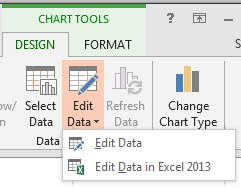
Learn how to edit chart data in PowerPoint 2013 for Windows.
Related Posts
 You may have started scratch with inserting a new chart on your PowerPoint slide. This of course brings up an instance of the Excel sheet with some du...
 Do you want to link to an Excel file from within PowerPoint? You can then use the technique explained within our Linking to Any File in PowerPoint 201...
 The chart templates you save within PowerPoint 2013 are saved into a default folder location which you do not have to worry about, as far as you are u...
 You can tweak your chart in PowerPoint as much as you want so that the resulting chart follows your specifications. Once you met a standard that you m...