
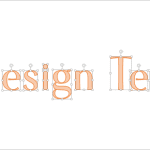
PowerPoint 2013 has several new features but there’s nothing quite like what we will explore on this page — an option to convert regular text into a shape. First of all, this is an undocumented feature — so it was really cool discovering how this was done. And then, this is such an utterly useful option — people find all sorts of excuses to use this feature. For example, you can now easily create logos in PowerPoint without using any other application. Or use a fancy font and then share that presentation with others in the knowledge that recipients can see the font exactly as intended, even if it’s not installed on their computers.

Related Posts
 PowerPoint 2013 enables you to use its repertoire of Shapes to create some amazing artwork. Its Merge Shape commands allow you to create complex shape...
 You know that Action Buttons are helpful because they at least look like buttons! But choices are limited to what PowerPoint provides – and let’s face...
 There is this video clip that Bruce Gabrielle posted on his blog, which shows how you can create a triangular table in PowerPoint by either creating a...
 PowerPoint is a ubiquitous presentation program that also works great as a simple drawing program. We have already done an extensive series of tutoria...