
We have already showed you how to use fills for shapes in PowerPoint 2013. A fill is something that is contained within the confines of the shape. Similarly, shapes have another attribute known as the “line” or the “outline”. A line is the perimeter surrounding a closed shape or the line itself within an open shape. In this tutorial, we’ll explore the basics and thereafter provide links to specific, individual tutorials so that you can get acquainted with more advanced stuff.

Make changes to the appearance of shape lines in PowerPoint 2013 for Windows.
Related Posts
 PowerPoint's fill, line, and effect attributes enable you to customize the look of shapes and other slide objects in your presentation. However, it ma...
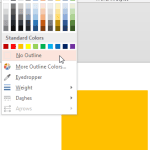 Whenever you insert a new shape into a PowerPoint slide, you can see that it is filled with a solid color and has an outline by default (this may diff...
 PowerPoint 2013 provides plenty of options to format Shape Outlines -- this tutorial explores an attribute that's rarely associated with shape outline...
 PowerPoint provides two types of shapes: open and close shapes. Shapes, such as rectangles, circles, etc. are closed shapes. Regular line shapes, such...