
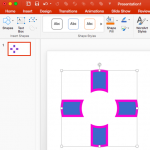
There are so many shapes available in PowerPoint, and that’s good because that means so many more possibilities to create your own unique shapes by using any of the Merge Shapes commands. One of the amazing options within Merge Shapes is Combine, which retains areas where the shapes do not overlap while removing the overlapping areas. Think of Combine as an amazing cutout option!

Learn how you can combine shapes in PowerPoint 2016 for Mac.
Related Posts
 PowerPoint takes the Merge Shapes command to a whole new level. Many of you know that you can merge shapes with other shapes and text, but did you kno...
 PowerPoint has several features that may amaze you, but there's nothing quite like what we will explore on this page: an option to convert regular tex...
 PowerPoint lets you change the appearance of merged shapes. However, don't assume that just because this is so easy-to-use, the end results won’t be s...
 PowerPoint 2016 for Mac lets you take a bunch of selected shapes and then apply one of the five Merge Shapes options to end up with some amazing resul...