
 (No Ratings Yet)
 Loading...
Stylizing text is one of those features that is grossly overlooked or entirely over-used in PowerPoint — and either of those situations can be a shame since PowerPoint allows you to do so much to text with its powerful WordArt feature. Before we proceed further, you must know that WordArt has nothing to do with Microsoft Word and is a totally independent feature in PowerPoint. What WordArt does to the text is similar to what PowerPoint’s Shape Styles do to shapes. WordArt Styles are a collection of some prebuilt text styles which you can instantly apply to your text. These WordArt Styles are all Theme-specific, so if the presentation’s Theme is changed, any WordArt applied also reflects the changes accordingly.
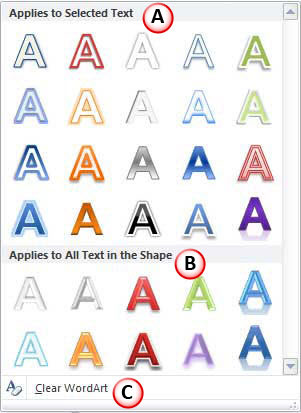
Learn how to stylize your text by applying WordArt Styles in PowerPoint 2010 for Windows.
Related Posts
 Have you ever been in a situation where your presentation looked so awesome with some amazing typography, but when you opened the same presentation on...
 There is no built-in tool for highlighting text in PowerPoint 2010. However, there is a workaround to highlight your PowerPoint text using the Text Hi...
 As of now, no PowerPoint version supports text highlighting as a feature you can add to selected text. And, before we explore a workaround to overcome...
 When your text paragraphs comprise multiple bulleted levels, indentation becomes a must to make your text look consistent and clear. Indent Markers vi...