
This is the print version of this page. All content is copyright Indezine.com 2000-2026.
Thoughts and impressions of happenings in the world of PowerPoint and presentations, continuously updated since 2003.
See Also:
PowerPoint and Presenting Notes
PowerPoint and Presenting Glossary

Gabe Anderson takes care of support and community initiatives at Articulate, a provider of rich media products used for e-learning.
In this conversation, Gabe discusses Articulate Quizmaker, how you can create quizzes, and how Quizmaker integrates with Articulate’s other products.
Geetesh: Tell us more about Articulate Quizmaker — and how it makes it easy to create quizzes fast.
Gabe: Articulate Quizmaker 2.0 is a comprehensive yet easy-to-use quiz creator for making highly customized Flash-based quizzes, assessments, and surveys without the need for difficult programming. It provides a form-based interface with one-click publishing to Flash so that anyone who can use PowerPoint can create attractive, Flash-based quizzes in no time — no Flash development experience required. There are 21 different graded and survey question types, which can be published to a stand-alone quiz or survey for use in your own Learning Management System or Articulate Online — with full tracking and reporting capabilities.
Geetesh: How does Articulate Quizmaker integrate with other Articulate programs?
Gabe: Quizmaker publishes seamlessly to Articulate Presenter so that you can embed your quizzes and surveys directly in your Presenter-powered courses. You can even choose to send the embedded quiz results directly to your own Learning Management System or Articulate Online. Publishing from Quizmaker to Articulate Online is simple – just plug in your account details once, then publish to your account in just one click.
You can see a demo of how easy it is to publish content from Quizmaker to Articulate Online in the tutorials section of our site. Look for the demo called Publishing from Quizmaker.
The views and opinions expressed in this blog post or content are those of the authors or the interviewees and do not necessarily reflect the official policy or position of any other agency, organization, employer, or company.
Filed Under:
Interviews
Tagged as: Add-in, Interviews, Online Presentations, PowerPoint, PowerPoint Flash
Comments Off on Articulate Quizmaker: Conversation with Gabe Anderson
There are many advantages in converting a PowerPoint presentation into a Flash SWF movie since they tend to be smaller in size, cannot be edited, and can easily be viewed in almost any operating system or computer these days. And with dozens of PowerPoint-Flash converting applications available, it’s easy to be spoilt for choice.
And with so many choices, every such application has to either do things better than others or add more capabilities. WildPresenter, the product we are reviewing, tries to do both—and in this review, we will explore if it succeeds or not.
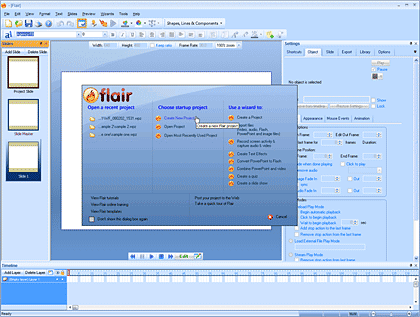
Read the Indezine review of Wildform Flair.
Filed Under:
Add-ins
Tagged as: Add-in, PowerPoint, PowerPoint Flash, Wildform
Comments Off on Wildform Flair: The Indezine Review

David Salaguinto is a writer on the Office User Assistance team at Microsoft. He creates comics to have fun and to connect with readers at his Office Online Web Comic blog. In this conversation, David discusses how he got started and where he gets inspiration from.
Geetesh: Tell us more about your work at Office Online. And how did you get started with the web-comics blog?
David: Mostly, I write about Visio for the people who use it, although I do occasionally write about other Microsoft Office programs if a team needs my help. Every month, we look at the feedback we receive from customers, and we try to address it. Sometimes it means we write new articles or update existing ones. Sometimes it means we produce a video demo or online training. Sometimes it means we try new things. They don’t always work, but we like to think we learn from our failures.
One of the things we wanted to try was a comic. A colleague of mine found a fascinating article about comics being used in unusual places. What if we did a comic for Office Online? I thought it sounded like a fun idea, so I jumped at the chance to create a comic using Visio. For my first comic, I did a rather simple one about printing:
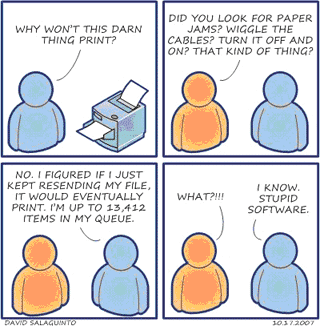
I personally thought it was kind of corny, but my coworkers seemed to like it, so I made more. Pretty soon, I was posting them online. You can read more about how I got started in this column I wrote for Office Online.
Geetesh: I love all the content you put up on the Office Online Web Comic blog — what inspires you for all the ideas based on Microsoft Office applications?
David: I get a lot of my ideas from my coworkers. Sometimes, someone will send me an idea for a comic, but more often than not, I’ll read something in an e-mail or overhear something in a meeting that strikes me as a possible source of humor. It turns out that jokes aren’t that hard to write. Finding irony and surprise in everyday things—like Microsoft Office—now, that’s hard. For example, I was reading something written by a coworker about how a PowerPoint deck can have multiple slide masters. I immediately thought of the saying, “No man can serve two masters,” which led me to this comic about PowerPoint and Marketing:
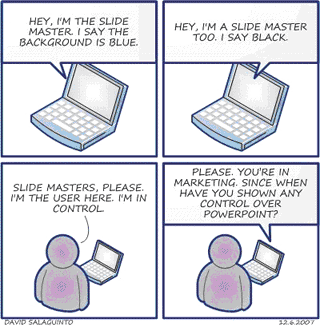
That’s where the ideas come from. As for the punch lines, well…I don’t actually know. They seem to come out of nowhere, but only after throwing out dozens of bad ones. You’d cringe in horror if you saw some of the bad punch lines I came up with for the preceding comic.
Geetesh: Tell us about some favorite posts you have put up, and why they are your favorites.
David: I think my favorite comics are the ones with the little pink girl in them. I have two young daughters myself, and I love the way they talk and how they look at the world. For example, I‘ve noticed that a lot of kids have started using PowerPoint in their school projects, which led me to this comic:
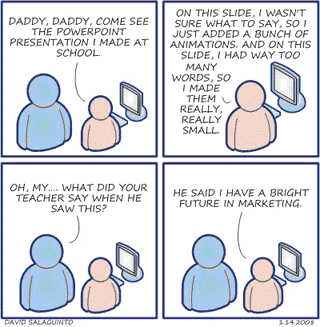
For this comic, I spent a lot of time crafting the words so they would ring true and sound believable. I also wanted to capture the excitement in the child and the caring in the father. In so far as the comic succeeds, I think it succeeds because of that (and not just because of the jibe at marketing—although that certainly helps). As you can probably tell, I have a lot of fun creating these comics, probably even more than you have reading them.
Filed Under:
Interviews
Tagged as: David Salaguinto, Graphics, Interviews, Microsoft, Microsoft Office, Visio
Comments Off on Office Online Web Comics: Conversation with David Salaguinto
After adding online presentation sharing 20 days ago, Google Presentations adds a quick new update in the form of vector shapes and PDF output.
AppScout reports that “Google Presentations is getting the ability to save documents as a PDF and PDF-based printing options. Users are also getting some basic drawing abilities and vector shapes, such as word bubbles and arrows.

The Wired Blog Network adds that “Google has released a new desktop uploader for Windows, making to much easier to move a large batch of files into Google Docs.”
Filed Under:
Companion Programs
Tagged as: Companion Programs, Google, Google Slides, Online Presentations, PowerPoint
Comments Off on Google Presentations Adds Vector Shapes and PDF Output
A decade or two ago, users played with PowerPoint around twice a month, made some overhead slides through a service provider and hired expensive equipment to show these at really big events. Nowadays, people create PowerPoint slides more often than they sneeze!
The result is that there are billions of slides in the presentation sphere — slides lost and mixed up in a chaotic land where it’s easier to spend to a few hours to create new slides than search and reuse the ones that cannot be found. Our review product Slide Executive Professional may be all the help you need.

Read the Indezine review of Slide Executive Professional.
Filed Under:
Add-ins
Tagged as: Add-in, PowerPoint, Slide Management
Comments Off on Slide Executive Professional: The Indezine Review
Microsoft and the Office logo are trademarks or registered trademarks of Microsoft Corporation in the United States and/or other countries.