
This is the print version of this page. All content is copyright Indezine.com 2000-2026.
Thoughts and impressions of happenings in the world of PowerPoint and presentations, continuously updated since 2003.
See Also:
PowerPoint and Presenting Notes
PowerPoint and Presenting Glossary
Most PowerPoint add-ins bring additional features into PowerPoint – these features range from multimedia to transitions and output and design. Graphicae is different – it brings a whole new organizational structure into your PowerPoint creation workflow. Graphicae is from Proof Software LLC, a company based in Canton, MA, United States. The company was founded by graduates of the Harvard Business School who have experience in management consulting, private equity and corporate management.

Filed Under:
Add-ins
Tagged as: Add-in, Graphicae, PowerPoint, Review
Most common missteps in sermon PowerPoint presentations? That’s hard to answer, said Kathy Jacobs, Microsoft MVP in PowerPoint, consultant and author of On PowerPoint.
There are so many. I would say the biggest ones are not planning, not practicing, and not learning the tool.

More on the Church Central site.
Filed Under:
Thoughts
Tagged as: Church, Kathy Jacobs, PowerPoint
Color Theory is a set of principles used to create harmonious color combinations. Color relationships can be visually represented with a color wheel — the color spectrum wrapped onto a circle. According to color theory, harmonious color combinations use any two colors opposite each other on the color wheel, any three colors equally spaced around the color wheel forming a triangle, or any four colors forming a rectangle (actually, two pairs of colors opposite each other). The harmonious color combinations are called color schemes – sometimes the term ‘color harmonies’ is also used. Color schemes remain harmonious regardless of the rotation angle.
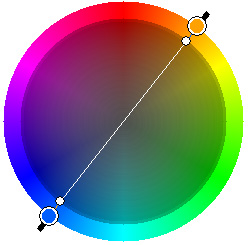
Leran about color theory, a set of principles used to create harmonious color combinations.
Filed Under:
Color
Tagged as: Color, Color Models, Guest Post
Back when we released WinPointer version 1, we were looking for a simple way to enhance PowerPoint and other presentations. With the original version, it was easy to highlight certain key areas of a screen to make a point, or for emphasis. Version 2 brought more functionality and a switch from Visual Basic to Delphi. But our users ended up finding additional uses for WinPointer, including using it to annotate screens to send to others and even to help with documentation and canned presentations. Now with WinPointer 3, we’ve added in new functionality that makes it simple to deliver annotated screens to others via e-mail, or even to create AVI-style movies of your annotations and then send them to others for playback.

Read more on the PC Magazine site.
Filed Under:
Companion Programs
Tagged as: Annotate, Companion
 Jim Endicott is a nationally-recognized consultant, designer, speaker specializing in professional presentation messaging, design and delivery. Jim has been a Jesse H. Neal award-winning columnist for Presentations magazine with his contributions to the magazine’s Creative Techniques column. Jim has also contributed presentation-related content in magazines like Business Week, Consulting and Selling Power as well as a being a paid contributor for a number of industry-related websites. In this interview, Jim discusses PowerPoint, presentation training and more.
Filed Under:
Interviews
Tagged as: Interviews, Jim Endicott, Presenting
Microsoft and the Office logo are trademarks or registered trademarks of Microsoft Corporation in the United States and/or other countries.