
This is the print version of this page. All content is copyright Indezine.com 2000-2026.
Thoughts and impressions of happenings in the world of PowerPoint and presentations, continuously updated since 2003.
See Also:
PowerPoint and Presenting Notes
PowerPoint and Presenting Glossary

Robert Kawalsky is the CEO and co-founder of Zeetings, a software company changing the way people present their ideas to the world. Robert is also an active investor and advisor to technology and internet-related businesses. He previously held the position of Portfolio Manager at Keybridge Capital where he grew and managed a portfolio of assets across shipping, aviation, renewable energy, and real estate. Robert began his career at Ernst & Young, holds a Bachelor of Commerce from the University of NSW and is a CFA Charterholder.
In this conversation, Robert talks about new features and ideas at Zeetings.
Geetesh: Rob, can you tell us more about the new features and improvements that Zeetings now provides?
Robert: Absolutely, I’d love to share ideas about new things you can do with Zeetings this year.
There are now more ways than ever to get your participants to interact. It is now very easy to add a web link slide to your Zeeting — these allow you to take your participants to a web page mid-presentation. With one click participants can jump to your website, a survey, your Twitter page, or anywhere else on the web. You can now add quick forms to your presentations; unlike polls, the info people submit in forms is just for you. Embedding content that you find online directly into your Zeetings has never been easier — we’re seeing users’ imaginations run wild putting live maps, GIFs, images, and videos between their slides. Polls continue to be one of our most popular features — there are four question formats already with more coming online over the next few weeks.
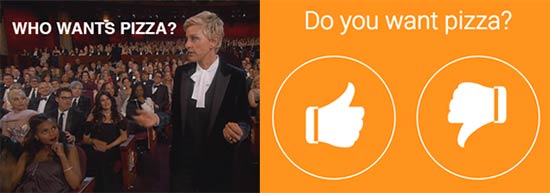
Next, we wanted to help people collect better information about their participants. It is now possible to request participants’ names and emails before they join your presentations. To help presenters access the information they collect, we have added a new tab to our Insights Reports called “Participants” which keeps track of everyone interacting with your presentations. These features are a great way of better understanding your participants and following up with them after each presentation.

Finally, in addition to adding new functionality, we have made existing functionality better. We have made the Activity feed much more powerful. You can now use hashtags to reference particular slides (and automatically connect that post to the slide) and use the @ symbol to mention particular people. Just type @ or # and a pre-filled list will pop up so it’s very easy to use. You can now also sort the Activity feed by most likes — this is a great way of seeing which questions and comments are most popular. Another great example is the ability to use your phone as a clicker. If you open the same Zeeting on your phone and laptop and start broadcasting from either device, they will automatically keep in sync. This means you can attach your laptop to the main screen and then use your phone to progress through the presentation.
Geetesh: Can you tell us about your favorite Zeetings feature, and why is it your favorite?
Robert: It’s always impossible to choose (!) but a feature I am really excited about at the moment is the Q & A Session. Zeetings has always empowered participants to post questions and comments during a presentation. Q&A Sessions allows the presenter or moderator to select a particular post and display it on the main screen to be answered. All this happens with just one click.

The reason I’m so excited about this feature is that it really makes participants part of the presentation — no longer are they just spectators. Now their thoughts, ideas, comments, and questions can be right up there on the main screen. Also, because the entire audience can upvote individual posts, everyone actually has the opportunity to influence what the presenter or panel addresses next. Also, by highlighting a particular post, everyone in the room and those tuning in remotely, know exactly what topic is being addressed at that moment.
We recently had a large bank use a Q&A Session for a town hall meeting with over 500 staff. During the meeting, hundreds of questions were posted to Activity, and there were thousands of upvotes. The moderator ordered the posts by popularity and pushed the top questions, one at a time, for the executives to answer. It was an extremely democratic way of giving everyone a voice and, importantly, established a high level of trust and transparency between the staff and executives because the questions the staff most wanted to be answered were addressed.
You May Also Like: Zeetings: Conversation with Robert Kawalsky
The views and opinions expressed in this blog are those of the authors and do not necessarily reflect the official policy or position of any other agency, organization, employer, or company.
Filed Under:
Interviews
Tagged as: Delivery, Interviews, Presentation Skills, Robert Kawalsky, Zeetings
Comments Off on New Ideas from Zeetings: Conversation with Robert Kawalsky
Do you want to add cover thumbnails to your YouTube videos? Moreover, what exactly does a YouTube cover thumbnail mean? Let’s first answer the second question! A YouTube thumbnail is what you see before you play the video. More often than not, this thumbnail content is automatically sourced by YouTube from the video, but you can create a high-quality thumbnail yourself using PowerPoint!

Download and use PowerPoint templates for YouTube custom thumbnails.
Filed Under:
Templates
Tagged as: Downloads, PowerPoint, Templates, YouTube
Comments Off on YouTube Custom Thumbnail Templates for PowerPoint
The Ribbon made its debut in PowerPoint 2011 for Mac. Unlike the PowerPoint versions on Windows though, the Ribbon did not replace all the menus and toolbars that were found in PowerPoint 2008 and older Mac versions. The Ribbon is essentially a long strip that’s fixed in size so that you cannot change its width or height. The Ribbon in PowerPoint 2016 for Mac includes several tabs and each tab is named.

Learn about Ribbon and Tabs in PowerPoint 2016 for Mac.
Filed Under:
PowerPoint 2016
Tagged as: Interface, Mac, Office 2016, Office for Mac, PowerPoint 2016, Tutorials, View
Comments Off on Ribbon and Tabs in PowerPoint 2016 for Mac
Unlike with typical programs, Sway was created from the ground-up to be a program that allows easy sharing. Once you create a Sway, you will want to share your Sway with colleagues, family, and even friends. Sway provides some awesome sharing options, and we will explore them in this tutorial.

Explore various options available that let you share your presentations in Microsoft Sway.
Filed Under:
Sway
Tagged as: Docs.com, Online Presentations, Share, Sway, Tutorials
Comments Off on Share Presentations in Microsoft Sway
Now that you have learned more about Dubsmash, you may even have created your Dubsmash videos. Won’t you want to share your videos with others?

Explore how you can share your Dubsmash videos.
Filed Under:
PowerPoint All Versions
Tagged as: Dubsmash, Share, Tutorials, Video
Comments Off on Sharing Dubsmash Videos
Microsoft and the Office logo are trademarks or registered trademarks of Microsoft Corporation in the United States and/or other countries.