
This is the print version of this page. All content is copyright Indezine.com 2000-2026.
Thoughts and impressions of happenings in the world of PowerPoint and presentations, continuously updated since 2003.
See Also:
PowerPoint and Presenting Notes
PowerPoint and Presenting Glossary
Sometimes, when you draw a line in PowerPoint that is slanted or sloped, you may thereafter want to know the length of your line. Believe it or not, there is no option to do this within the program. Unless you go and revisit your school geometry class!
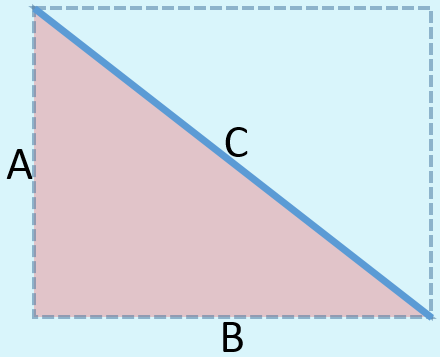
Learn how to find out the length of a slanted (diagonal) line in PowerPoint 2013 for Windows.
Filed Under:
PowerPoint 2013
Tagged as: PowerPoint 2013, Shapes, Tutorials
Comments Off on Learn PowerPoint 2013 for Windows: Finding Length of a Diagonal Line

Kurt Dupont, based out of Belgium heads PresentationPoint, a company that creates several amazing PowerPoint add-ins. After his Computer Science studies, Kurt started with Andersen Consulting (Accenture nowadays) in Brussels. After 3 years he moved to the Brussels Airport Terminal Company that runs the Brussels airport – this last placement inspired the start-up of Take-off (now known as PresentationPoint) in 1998.
In this conversation, Kurt discusses PresentationLand, a new site that showcases PresentationPoint products.
Filed Under:
Interviews
Tagged as: Add-in, Interviews, Kurt Dupont, PowerPoint, PresentationPoint
Comments Off on PresentationLand: Conversation with Kurt Dupont
After inserting a SmartArt graphic in your slide, you can change the color for the entire SmartArt graphic — this applies new colors to the entire SmartArt graphic including the various shapes it contains. However there may be times when you want one of the shapes to be colored differently — in this tutorial we’ll explore the fill, line, and effect options which can be applied to individual shapes within a SmartArt graphic in PowerPoint 2013.

Filed Under:
PowerPoint 2013
Tagged as: PowerPoint 2013, SmartArt, Tutorials
Comments Off on Learn PowerPoint 2013 for Windows: Changing Fill, Line, and Effects for Shapes within SmartArt
In PowerPoint 2013, you rotate shapes using the white rotation handle that appears when you select a shape. However, have you ever noticed that the open line shape in PowerPoint doesn’t show a white rotation handle? Now, if you want to rotate any diagonal line to make it either a perfect horizontal, or vertical line, how would you do that?

Learn how to change a diagonal line to a horizontal / vertical line in PowerPoint 2013 for Windows.
Filed Under:
PowerPoint 2013
Tagged as: PowerPoint 2013, Shapes, Tutorials
Comments Off on Learn PowerPoint 2013 for Windows: Change a Diagonal Line to a Horizontal / Vertical Line
 Naomi S. Baron is Professor of Linguistics and Executive Director of the Center for Teaching, Research, and Learning at American University in Washington, DC. A Guggenheim Fellow and Swedish Fulbright Fellow, she is the author of seven books on language. Always On: Language in an Online and Mobile World was the 2008 winner of the Duke of Edinburgh English-Speaking Union English Language Book Award. Her new book, Words Onscreen: The Fate of Reading in a Digital World, which explores how digital technology redefines what it means to read, will be published by Oxford University Press this winter.
In this conversation, Naomi discusses her new book, and what PowerPoint users need to learn from the book.
Geetesh: Skimming content rather than absorbing seems to have become the norm these days. And PowerPoint by its very format seems to invite the former rather than the latter – unless the absorption option is provided by a proficient speaker. Can you share your thoughts?
Naomi: Like most tools, PowerPoint can be both a blessing and a curse. Used wisely, it enables speakers to cut to the chase of what they really want to say. It also provides added perceptual channels – written words, visual images, color, and maybe sound — that reinforce the spoken message.
The challenge of PowerPoint is that it lures us into believing that all ideas can be shoehorned into its format. That the complexity of human thought is reducible to bullet points. Given how much experience we now all have with PowerPoint, we have developed a PowerPoint state of mind. As audiences, we increasingly assume that whatever we read – a PowerPoint slide or a novel – should be short, straightforward, and only worth reading once.
Geetesh: You speak about how this problem exists in areas beyond PowerPoint in media such as ebooks. You have also written a book, Words Onscreen: The Fate of Reading in a Digital World on this subject. Can you share some info about your research and new book?
Naomi: The kind of one-off reading encouraged by PowerPoint is showing up in the way we read on digital screens more generally. Whether it’s on laptops, eReaders, tablets, or mobile phones, we are witnessing a growing tendency to replace deep reading with a more superficial approach to the written word. Digital devices encourage us to search for information, not to ponder ideas.
 My research with university students in the US, Germany, and Japan reinforces anecdotal evidence that when reading on a digital platform, we do incredibly more multitasking and are far less able to concentrate than when reading printed works. We also are less likely to reread digital texts and, according to some studies, less likely to remember what we read and less likely to have an analytical understanding of the content. While young adults are avid technology users, a wealth of studies (including my own) show these users prefer reading in hardcopy over reading onscreen – both for schoolwork and for pleasure reading.
As eBooks continue to edge out print, we need to do some serious thinking about how digital reading styles – supported by the PowerPoint state of mind – may be undermining our ability to have sustained, uninterrupted encounters with serious books.
The views and opinions expressed in this blog post or content are those of the authors or the interviewees and do not necessarily reflect the official policy or position of any other agency, organization, employer, or company.
Filed Under:
Interviews
Tagged as: Books, Interviews, Opinion, PowerPoint
Comments Off on The Fate of Reading in a Digital World: Conversation with Naomi S. Baron
Microsoft and the Office logo are trademarks or registered trademarks of Microsoft Corporation in the United States and/or other countries.