
This is the print version of this page. All content is copyright Indezine.com 2000-2026.
Thoughts and impressions of happenings in the world of PowerPoint and presentations, continuously updated since 2003.
See Also:
PowerPoint and Presenting Notes
PowerPoint and Presenting Glossary
Let’s imagine you got your animation just right — you tweaked the speed, set the animation event, etc. Now, you need to apply the same animation to 50 other slide objects within the presentation! Typically, you may have to spend an enormous amount of time for such a repetitive task, manually applying the animations so many times! Fortunately, the Animation Painter feature can help.
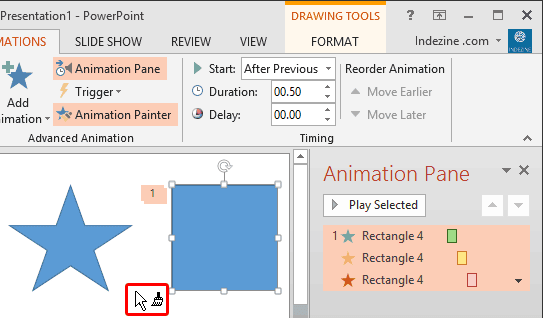
Learn how to use the Animation Painter command effectively in PowerPoint 2013 for Windows.
Filed Under:
PowerPoint 2013
Tagged as: Animation, PowerPoint 2013, Tutorials
Comments Off on Animation Painter in PowerPoint 2013 for Windows
A decade ago, everyone wanted to insert SWFs into their PowerPoint slides. There were dozens of free and paid PowerPoint add-ins that did this task for you, and if you were patient enough, then you could also do this manually. But now new versions of PowerPoint allow you to add SWFs as a video clip — and also the need to insert SWFs has reduced. Adobe Presenter also enables you to insert a SWF file within your presentation slide — the inserted SWF plays in PowerPoint too if you have the Flash ActiveX Control installed.

Explore how to insert SWF files using Adobe Presenter.
Filed Under:
Add-ins
Tagged as: Add-in, Adobe Presenter, PowerPoint, Tutorials
Comments Off on Insert SWFs using Adobe Presenter
While there’s always going to be some people who can end up with wonderful charting results without any planning, it does not work that way for everyone. To understand this better, let’s explore an analogy. Have you seen those folks, who have the gift of the ladle? They need no clues about what they are cooking, yet they just seem to know what to do next. And they end up creating a culinary masterpiece. But most others cannot do so, and may end up with a culinary disaster without planning. It works the same way with charts — the more you plan, the better your charts will look, and be more capable of explaining your numerical message to the audience.

Planning your chart before you begin is a great way to create better charts.
Filed Under:
PowerPoint All Versions
Tagged as: Charting, Design, PowerPoint, Tutorials
Comments Off on Plan Your Chart Type
Once you add animation to any slide object, you can set its animation speed and choose an animation event. Other than speed and event, you can also alter the delay caused before the animation actually starts. So why would you add a delay? There are several reasons and primarily a delay can be beneficial if you want to maintain a time limit between two animations — as in having the second animation occur 10 seconds after the first one has started/concluded. Of course, that was just a simple example and animation delay can be helpful in many other scenarios.

Learn about Animation Delay, an option that lets you delay any animation for a given amount of time.
Filed Under:
PowerPoint 2013
Tagged as: Animation, PowerPoint 2013, Tutorials
Comments Off on Animation Delay in PowerPoint 2013 for Windows
This week we bring you Irregular Shapes, and again you can get them for next to nothing. Then we begin a new series that will explore 10 ways to create cool looking charts. And we share an amazing tip on how you can create a graphic that shows your headline in a newspaper! And then we get to exploring the CMYK color model.
PowerPoint 2013 users can learn about re-ordering and changing animations. We also explore animating charts and text, and explore showing and hiding the Animation task pane. We also bring you some tutorials on using Adobe Presenter.
And finally, do not miss the new discussions and templates of this week!

Read Indezine’s PowerPoint and Presenting News.
Filed Under:
Uncategorized
Tagged as: Ezine, PowerPoint
Comments Off on PowerPoint and Presenting News: August 5, 2014
Microsoft and the Office logo are trademarks or registered trademarks of Microsoft Corporation in the United States and/or other countries.