
Inserting a chart in PowerPoint is very simple, and you can take two approaches to adding one on your slide. Either you choose a layout for your slide that already has a content placeholder, or you use the Insert tab of the Ribbon and then click the Chart button.

Learn how you can insert a chart in PowerPoint 2010 for Windows.
Related Posts
 In your chart, Axis Labels are the labels for the Categories and Values on chart axes. So where do these labels come from? Category axis labels reflec...
 While learning about chart axes, you will come across two terms, Major and Minor units. These are the intervals at which the axis spaces itself -- as ...
 Charts are a visual representation of data, and when seen on a PowerPoint slide from afar, you make out the value of a series by exploring where exact...
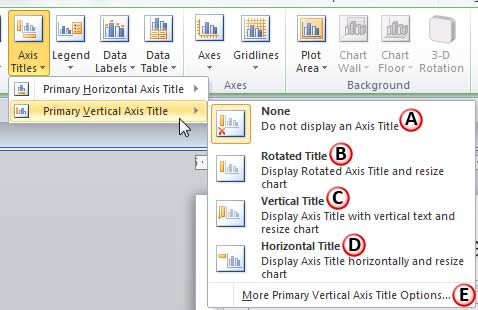 In a chart, the text used to label the chart axis is called Axis Title. All chart types other than Pie and Doughnut have axes -- and although Radar ch...