
 (No Ratings Yet)
 Loading...
PowerPoint provides an extensive array of built-in shapes which help you create great looking graphics for your slides. You can manipulate these graphics by dragging their yellow squares or combining them — but at times, you may not achieve the exact appearance you want. For instance, you might want a little curve in your shape edges rather than conventional straight lines. PowerPoint does allow you to tweak and make your shape look more organic than geometric curved lines.

Learn how to create curved shapes in PowerPoint 2013 for Windows.
Related Posts
 You know that Action Buttons are helpful because they at least look like buttons! But choices are limited to what PowerPoint provides – and let’s face...
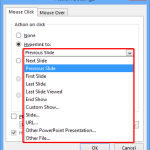 Just inserting Action Buttons on your slide is not sufficient -- you need to apply hyperlinks to them so that they have some function. You have alread...
 Once you place Action Buttons on your slide in PowerPoint 2013 for Windows, you can make them do all sorts of actions when clicked. What sets Action B...
 It is easy to flip and rotate a picture on your slide. However this same flipping can be a little tricky when you use a Picture fill within a shape. T...