
Do you want to create a flower diagram, or just draw a normal flower? You will soon realize that PowerPoint’s Shape Gallery offers no Petal shape or even no Leaf shape. However, PowerPoint’s amazing Merge Shapes tools allow you to create almost any shape without having actually to draw anything. And they also allow you to create convincing Petal shapes. We show you two ways to create a Petal shape in PowerPoint. The first way uses the Merge Shapes’ Union tool to create a tapered petal whereas the second way uses the Merge Shapes’ Fragment tool to create a curved petal.
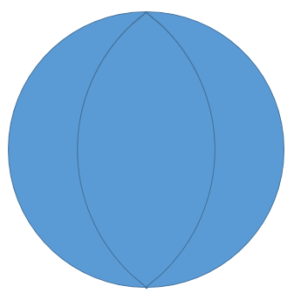
Learn to draw petal shapes in PowerPoint quickly.
Related Posts
 Do you need to draw two lines so that they are angled out at a certain value from each other? Do you need to do so accurately so that these drawings c...
 Many times, you may want to add an image within a star shaped container, or any other container shape, such as a diamond, a teardrop, or even a triang...
 Do you want to add a picture that fills not one but many shapes? And do you want the picture fill to span across multiple shapes? Is that doable? Yes,...
 PowerPoint offers so many shapes, from simple rectangles and ovals to playful options like pies and smiley faces. While you can use these shapes as-is...