
Enabling Guides for your presentation slides helps ensure that your objects are easily aligned, and also in the same relative position in successive slides. But just enabling Guides is more like getting started. There’s so much more you can do, such as customizing the Guides themselves using hierarchical options. PowerPoint 2016 also lets you work with Guides on a higher hierarchical level within the Slide Master and individual Slide Layouts. Depending on whether you added Guides within the Slide Master, an individual Slide Layout, or even a normal slide, your Guides are color-coded for easy identification.
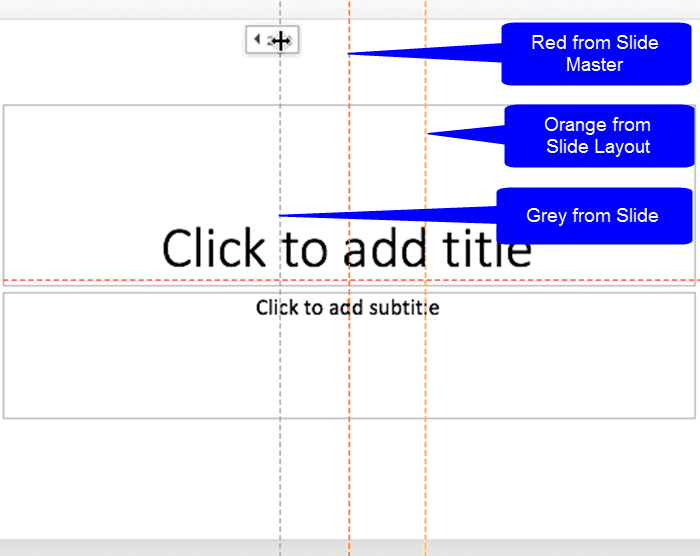
Learn about the hierarchical Guide options in PowerPoint 2016 for Mac.
Related Posts
 To begin, let's start with the basics. What are Guides in PowerPoint? Consider Guides as individual lines from a grid on your slide that you create. E...
 Once you have made Guides visible on your PowerPoint slides, they show up in the same position on all other slides within the presentation. You'll fin...
 Guides in PowerPoint allow you to position and snap your slide objects in place. For most professional slide designers, creating slides without guides...
 Do you want to insert video clips within your PowerPoint slides? Videos can be useful to express your message, and PowerPoint lets you easily insert v...