

Mike Power owns and runs Neuxpower, the company behind the popular compression software NXPowerLite, WeCompress, and now Slidewise, a PowerPoint fonts and media add-in. He has been running Neuxpower for more than 20 years, which makes him feel a tiny bit old. Although he generally has a company to run, he loves nothing more than getting stuck into designing software. He’s particularly fussy (some might say meticulous) about ensuring that Neuxpower retains a focus on simple, unfussy software that just gets the job done.
In this conversation, Mike talks about the new version of Slidewise.
Geetesh: Mike, can you share what’s new in Slidewise 1.3?
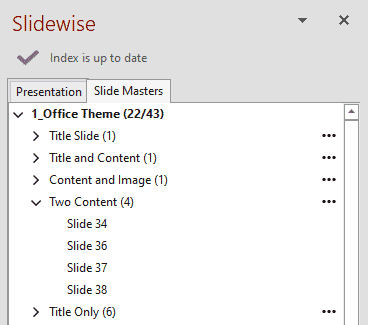
Mike: In version 1.3 of Slidewise, in addition to showing users all the fonts, media and links in their presentations, we’ve added a new tab, to give insight and control over slide masters and layouts.
In PowerPoint, it is possible in the Slide Master view to rollover a layout, and reveal a tooltip showing which slides it is used by, but this is tricky to use, and if a layout is used by a lot of slides the tooltip will be truncated, like below:

Our aim with Slidewise 1.3 is to provide a clear overview of which layouts are used by which slides. It also shows clearly when there are masters and layouts that aren’t needed, and to make it easy to reassign slides between layouts in bulk. Watch it in action here:
The new feature is already very helpful, and there’s a lot more we can do to make the job of cleaning up masters and layouts even easier, so watch out for more updates soon.
Geetesh: How do users get Slidewise? Also, is a trial version available?
Mike: Slidewise comes with a 14-day free trial, which can be downloaded from the product page on our website here.
The views and opinions expressed in this blog are those of the authors and do not necessarily reflect the official policy or position of any other agency, organization, employer or company.
Related Posts
 Mike Power owns and runs Neuxpower, the company behind the popular file compressor NXPowerLite and the amazing Pow...
 Mike Power owns and runs Neuxpower, the company behind the popular file compressor NXPowerLite and the amazing Pow...
 Mike Power owns and runs Neuxpower, the company behind the popular file compressor NXPowerLite and the amazing Pow...
 Mike Power owns and runs Neuxpower, the company behind the popular compression software NXPowerLite and now also t...