

Garik Gevorgyan is the Product Manager and Head of the Business Development at Chartrics. He worked in the IT industry for more than 7 years and implemented different software solutions for multiple businesses overseas. He is experienced in gathering requirements and understanding specific business needs. He is also a certified Salesforce, Sage, and Tableau consultant with proven experience in generating and building business relationships, managing projects from concept to completion, and coaching individuals to success.
In this conversation, Garik discusses the Chartrics add-in.
Geetesh: Garik, please tell us more about the Chartrics add-in for PowerPoint. What motivated you to create this add-in, and who according to you, is your typical user?
Garik: Chartrics is the first cloud-enforced PowerPoint add-in to link raw survey data directly to PowerPoint charts, so when the data changes they will be automatically updated.
Typically, when the survey is completed and it is time to convert the data into meaningful insights, researchers use different tools to analyze the data and then copy-paste the results into PowerPoint. This is the most time-consuming task in reporting, especially in the case of recurring studies like trackers, syndicated reports, wave analysis, and more. So, to make the process easier, faster, and more accurate, we designed the Chartrics PowerPoint add-in that provides researchers with necessary tools integrated right into PowerPoint.
For example, with the Chart Maker tool, researchers can :
- Connect PowerPoint charts with the raw survey data,
- Create crosstabs by dragging and dropping the variables,
- Do standard data manipulations (filter, sort, merge categories, format, etc.)
You can do all this without leaving the PowerPoint workspace.
Geetesh: What motivated you to create this add-in?
Garik: Over many years we have designed software solutions to meet the specific needs of market researchers in leading companies, like Kantar. With time and experience, we have discovered that those challenges are common to the entire industry. This inspired us to bring what was exclusive for market leaders to every company, anywhere, of any size. With the Chartrics PowerPoint add-in, we want to share the industry best practices with everyone.
Geetesh: Who according to you, is your typical user?
Garik: Though we have designed Chartrics by placing the specific needs of market researchers and market research & consulting companies at the center, it can be successfully used by anyone who presents reports in PowerPoint and periodically updates them with the new data.
Geetesh: How easy or difficult is it to use Chartrics? Are any quick-start tutorials or sample files available? Also, do you provide a trial version?
Garik: The design of the app has been implemented exclusively based on the business process logic and industry experts’ opinions, to deliver a user-friendly application. For example,
- First, comes the Cloud tab, where the user needs to upload a dataset and a branded PowerPoint template (if there is one).
- Then you can see Chart Center, from where the user can insert the desired chart type on the slide.
- And finally, the Chart Maker tool is used to connect the already uploaded dataset to the desired Chart type.

Geetesh: Garik, are any quick-start tutorials or sample files available? Also, do you provide a trial version?
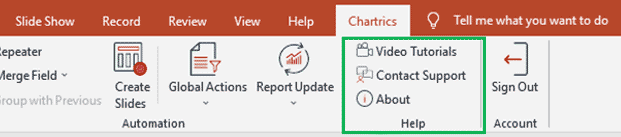
Garik: You can find our video tutorials from A to Z on our YouTube channel and on the Chartrics website. To access them, just click the Video Tutorials icon on the right corner of the Chartics Ribbon tab in PowerPoint, or search for Chartrics on YouTube. Besides, users can contact our support, and request an individual demo if necessary.
Sure, you can go to the Chartrics site, and download the trial version for free.
Related Posts
 Laszlo Diewald has been working as a consultant for more than 10 years now. He started his career as an employee right after h...
 Sam Schreim is the entrepreneur behind StoryTelling Charts, a free PowerPoint plugin that empowers professionals with top-tier...
 Thomas Häger is the managing partner and founder of Heron Consulting, a consulting company focused on operations s...
 Markus Hannebauer is co-founder and CEO of think-cell, where he is in charge of Marketing, Sales, Operations and Finance. He i...