

Sam Schreim is the entrepreneur behind StoryTelling Charts, a free PowerPoint plugin that empowers professionals with top-tier data visuals. Over two decades in strategy and management consulting, plus five years in corporate America, Sam recognized the need for clarity and polish in data presentations. He holds an MBA from Columbia University and a MS in Computer Engineering from the University of Connecticut. Sam trademarked his Storytelling with Charts framework, authored a 2022 book of the same name, and now dedicates himself to democratizing professional-grade data storytelling for audiences worldwide.
In this conversation, Sam discusses StoryTelling Charts.
Geetesh: What inspired the creation of StoryTelling Charts?
Sam: StoryTelling Charts was born out of a frustration familiar to many a professional: default PowerPoint charts don’t tend to excite an audience nor do they effectively communicate complex insights. In my early corporate days, I’d spend tens of hours poring over data, looking for trends in patterns or numbers, and analyzing metrics—but the potential impact of my findings often fizzled off in passably mediocre slide design. All my time and effort went to waste because I messed up in the presentation and the visualization of my analysis.
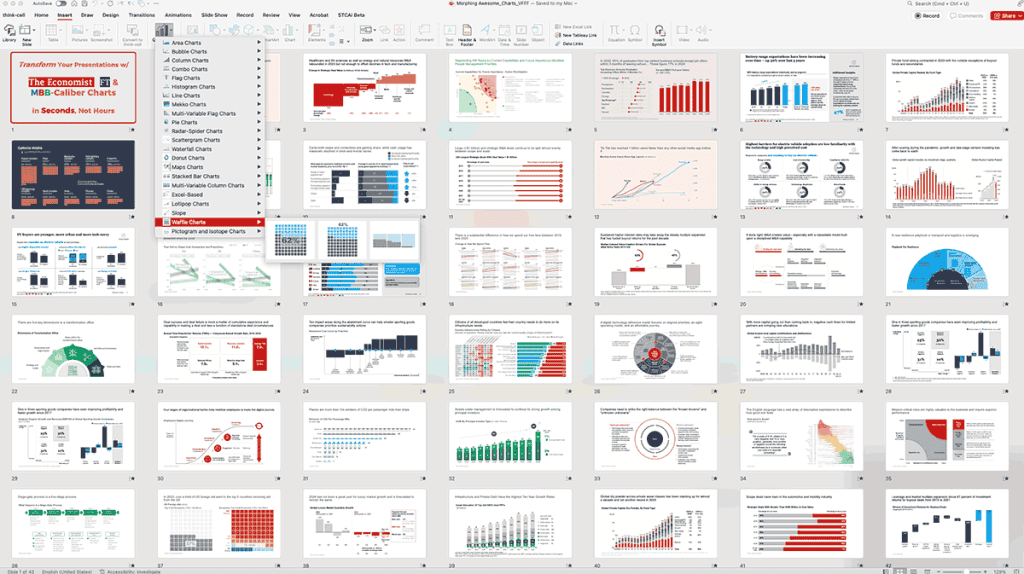
Setting the Standard in Consulting
When I moved into strategy and management consulting, it was worse. Elite firms like McKinsey, BCG and Bain — as well as publications such as The Financial Times and The Economist — established the gold standard for eye-popping but analytically precise graphs. Their visuals are not just attractive; they direct the reader’s eye to the most important facts, providing context that highlights each insight. Aiming for this standard, I realized I was spending almost 80% of my time on just generating charts and preparing slides. Later, when I started mentoring new hires, I would see them fumble through the same tedious processes I had experienced — creating slides for hours instead of focusing more on in-depth analysis and working on the actual narrative behind the data.
Learning the Hard Way
Even prior to my consulting career, I learned an important lesson about communication: well-reasoned analysis falls flat if it is not presented well. I’d spend weeks researching and discovering, only to see the heart of my findings evaporate in slides that were either too busy or too dull. The continuous struggle, be it in corporate or the consulting world, became the tipping point which encouraged me to create a systematic way of working.
A Framework, a Book, and a Software Tool
For a while, I had been working with a methodology that I refer to as Storytelling with Charts—it’s a framework I trademarked for my 2022 book of the same title because it has become one of the most fundamental ways I approach my work. Seeing how quickly it helped new hires understand the art and science of data visualization, I wanted to form a software tool around it. This tool automates a lot of those design best practices that usually consume hours of hands-on labor. In doing so, it drastically increased my team’s productivity—at least ten times over—and freed up their time to work on insights, not formatting.

Democratizing Elite Data Narrative
Having already put in the time to build the tool for my own teams, I decided to publish it to the public as a free resource, bringing professional-grade data storytelling to the masses. Now, everyone with a copy of PowerPoint — which an estimated 500 million people use around the world — can bypass the drudgery of creating slides and instead focus on shaping his or her message. At the heart of it, StoryTelling Charts enables all presenters to become elite authors of visual stories with little effort allowing them to convert complex data into compelling and memorable stories that incite action.
Geetesh: How does StoryTelling Charts help presenters go beyond traditional PowerPoint visuals?
Sam: Realizing there was a demand for clearer, more inspiring presentations — and inspired by my 20 years as strategy consultant and how the best firms and publications spin stories out of data — Charts was born to help professionals everywhere do the same with the same level of polish and impact. Instead of bland, one-size-fits-all templates, the idea is for presenters to take advantage of the best visual storytelling techniques available. The result? Built-in to sculpting your story, leading the audience through every insight, translating complex data into powerful, actionable narratives.
- Elevating Visual Quality: Native PowerPoint’s inbuilt chart templates are decent enough, but they can stand out as stale and without the polish you’d expect from a management consulting deck or a business publication. StoryTelling Charts incorporates best practices in design and data visualization—everything from color choice to layout spacing—such thatyour slides are automatically imbued with the polish and professionalism clients and stakeholders have come to expect from elite firms.
- Automating Best Practices: Manually refining charts to ensure adherence to brand style guides or to emphasize valuable insights can be an onerous and error-prone process. Storytelling Charts lightens this load. It automates design decisions such as optimal labeling, color contrasts, and the placement of annotations across slides totaling time-saving, and consistency.
- Zeroing in on the Narrative: Too often, important discoveries are obscured by visual noise. Promoting a “less is more” approach, Storytelling Charts makes sure that every chart and graphic that is used has its own explicit story—emphasizing milestones if displayed in a timeline, trends if shown in a line graph, details in a waterfall chart, etc. The plugin keeps the audience laser-focused on the story you want to tell.
- Democratizing Elite-Level Data Storytelling: In high-stakes environments — like board presentations or client pitches — professional visuals can be a game-changer. However, most professionals lack specialized design teams or the time to master complex data visualization software. Storytelling Charts closes this gap by introducing you to powerful, intuitive charts inside the PowerPoint application, so that even non-designers can create MBB-based visuals.
- Driving More Engagement and Retention: A chart needs to do more than just show numbers; it needs to stimulate thought and query and guide toward insights. Inspired by The Economist and Financial Times’ journalistic style, Storytelling Charts helps presenters to create slides that appeal to both the brain and the heart. The result is more engagement and better retention of the message, because the data is presented clearly and compellingly.
- Revolutionizing Presentations: Presenting data visually through Storytelling Charts sets out to change the way professionals look at their data, eliminating the coding and design bottlenecks separating cold hard facts from actionable insights. Combining sophisticated chart types, best-practice design principles, and automated ease-of-use, the plugin empowers you to deliver the clarity, sophistication, and impact that the best organizations in the world are expected to share with their audience.
It’s also free—because the power to tell a compelling, data-rich story shouldn’t be kept behind an expensive design suite. With StoryTelling Charts, anyone can create impactful, conversation-starting, action-inducing slides regardless of the size and intricacy of the data.

Geetesh: What are some common mistakes presenters make when visualizing data, and how can Storytelling Charts help avoid them?
Sam: Even the most seasoned presenters may find it difficult to structure their story, organize their data, and deliver a clear message. Whether it’s shoehorning too many takeaways into one slide, confusing the logical sequencing of the presentation, or preferring glittery gimmicks (e.g., bullet points with stock photos, animation, etc.) to sound analysis, these mistakes spoil the impact of your entire deck. We created the Storytelling Charts with best practices in mind—so that each of your slides transmits an individual and clear message, each one of the graphs will back it and your presentation will be an overall strong narrative. Here’s some of the most common mistakes, and how Storytelling Charts can help you avoid them.
- Attempting to Convey Several Messages in a Single Slide
- What NOT To Do: Cramming several key points onto a single slide dilutes the impact of each individual message. Competing ideas are hard for audiences to follow, so the story becomes muddled.
- How Storytelling Charts Helps:It promotes the “one-message-per-slide” approach. By streamlining design choices and suggesting that you zero in on a single insight, Storytelling Charts makes it even simpler to dissect the components of a complex idea into several slides, ensuring a sharp feeling for every single point.
- Mixing Horizontal with Vertical Logic
- Horizontal Logic: This is your overall story. Meaning, what slides you need — and, most importantly, in what order— to tell a coherent story. And if each message merits a slide, then horizontal logic dictates how you shape the flow of the whole presentation.
- Vertical Logic: This emerges from the content on each slide. Once you know your message, figure out what data (charts, tables, diagrams and so on) are best suited to support it.
- The Mistake: Sourcing the data and then asking yourself “How do I put this into a slide?” Starting with data first can create overcrowded slides with no key takeaway.
- How Storytelling Charts Helps: Storytelling Charts is designed to help presenters develop a story-based process by emphasizing clarity of message from the outset. You derive key insights (horizontal logic), then choose or customize the charts (vertical logic) that support each insight. This means each slide focuses on a point backed by relevant supporting data.
- Focusing More on Gimmicky Slides Instead of Sound Analysis
- The Mistake: Splashy or “flamboyant” graphics or visuals might seem impressive when first they’re seen, but they can distract from the data, bury insights and undermine credibility.
- How Storytelling Charts Helps: Rather than focusing on gimmicks, it uses time-proven, professional chart formats drawn from the playbooks of high-end consulting firms and respected publications. Focusing on analytical clarity instead of fluff, Storytelling Charts makes sure that your visuals support the narrative and reveal the data—not hide it.
In fact, the real power comes from mastering the “horizontal logic” — planning the story structure of your presentation first, then choosing your data (the “vertical logic”) to support each of your messages. StoryTelling Charts simplifies this workflow by providing polished user-friendly templates that conform with this best practice. It will free you from struggling with formatting so that you can get back to crafting a better story—one slide, one message, one actionable insight at a time.
The views and opinions expressed in this blog post or content are those of the authors or the interviewees and do not necessarily reflect the official policy or position of any other agency, organization, employer, or company.
Related Posts
 Laszlo Diewald has been working as a consultant for more than 10 years now. He started his career as an employee right after h...
 Garik Gevorgyan is the Product Manager and Head of the Business Development at Chartrics. He worked in the IT industry for more than 7 yea...
 Thomas Häger is the managing partner and founder of Heron Consulting, a consulting company focused on operations s...
 Markus Hannebauer is co-founder and CEO of think-cell, where he is in charge of Marketing, Sales, Operations and Finance. He i...