
 (1 votes, average: 5.00 out of 5)
 Loading...
Richard Goring is a Director at BrightCarbon, a presentation and eLearning agency. He enjoys helping people create engaging content and communicate effectively using visuals, diagrams, and animated sequences that explain and reinforce the key points, which is supported by plenty of resources and tips at the BrightCarbon site.
In this interview, Richard discusses BrightCarbon’s BrightSlide, a design productivity add-in for PowerPoint.
Geetesh: Tell us more about BrightSlide, your PowerPoint add-in. Why did you decide to create this add-in?
Richard: BrightSlide is a design productivity add-in for PowerPoint, allowing you to create content more quickly and easily. The company, BrightCarbon, is actually a presentation design agency, and we create visual storytelling presentations for our clients, so we’re using PowerPoint all the time. Like many PowerPoint users, we had several frustrations with the tool, and decided to try and fix them. We all gathered together in a company-wide off-site meeting and wrote down everything we would like to change about PowerPoint – a very cathartic process! We then figured out a feature set to aim for that would help us most and be something we could achieve. The result was BrightSlide.
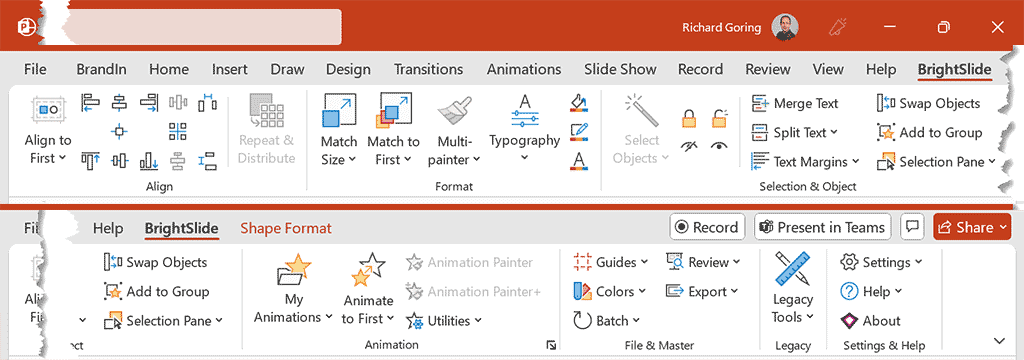
It has a lot of different features packed in, and my personal favorites are the Align to First tools and Animation Library.
Alignment in PowerPoint can be a bit of a pain as it’s all about relative positions of objects, so you need to think about everything you have selected to use them, and it’s not always as intuitive or quick as you’d like. With BrightSlide, you can specify one object to align everything to, which is a lot more intuitive. And it’s really easy to activate – just press the Shift key. It becomes a seamless part of your workflow and makes things much faster.

A lot of our presentations for clients make extensive use of animations to tell stories and communicate effectively. Standard animations in PowerPoint are OK, but changing the settings or combining animations can really elevate the message. BrightSlide has a Library function, with a selection of pre-made animation combinations, but also the ability to add your own. It also saves a lot of time, as you can apply the group of animations you want with one click, rather than take a couple of minutes each time.

BrightSlide has saved us so much time as an agency. It’s also given us the ability to create presentations, animations, and explainer videos that are really dynamic and impactful, and develop PowerPoint templates that are a lot more robust, because of the various functions it contains.
Geetesh: Most users are amazed at first when they realize that this full-featured add-in is available for no cost at all. Why did you decide to give it away to everyone?
Richard: As we were building out the features and testing everything, we began to realize, without wishing to be immodest, just how good BrightSlide was and how much it helped. And then started to think about what to do with it. A wonderful thing in the world of presentations is the community around it. You, with Indezine, and our friends in the Presentation Guild are great examples. At BrightCarbon, we also love to share knowledge and resources through our blog, and the free 30 minutes masterclasses we run every Thursday (which we’ve done since we started over ten years ago).
It just seemed like the right thing to do to share BrightSlide. It had been created by presentation people, for presentation people. We don’t have a sales team and the idea of trying to sell it really didn’t seem like it would be as fun and seeing how the community reacted to it and what they were able to do. We also love getting feedback and ideas from everyone for even more functions
We often get asked why it’s free, and quite a few people who ask to pay for it, assuming it will unlock more features, but it won’t. We do have other add-ins for PowerPoint that are more focused on enterprise, like our BrandIn tool, and that is a paid product, and each instance needs to be pretty customized. But all the tools in BrightSlide will be free. Really, it’s about sharing and trying to help the community put an end to terrible presentations, one slide at a time.
If you’d like to try it, you can download BrightSlide for free from the BrightCarbon website.
You May Also Like: BrightSlide: Creating a Revolutionary PowerPoint Add-in
The views and opinions expressed in this blog post or content are those of the authors or the interviewees and do not necessarily reflect the official policy or position of any other agency, organization, employer, or company.
Related Posts
 Richard Goring is a Director at BrightCarbon, a presentation and eLearning agency. He enjoys helping people create engaging co...
 Jamie Garroch is a Technical Consultant at BrightCarbon, the specialist presentation and eLearning agency. He develops PowerPoint automati...
 Richard Goring is a Director at BrightCarbon, the specialist presentation and eLearning agency. He enjoys helping people create engaging c...
 Peter Claus Lamprecht is a presentation consultant based in Hamburg, Germany, with more than 37 years of experience. He helps self-employe...