

Jamie Garroch is a Technical Consultant at BrightCarbon, the specialist presentation and eLearning agency. He develops PowerPoint automation solutions and add-ins that enable presentation authors to work smarter. He also trains people to present more effectively using visuals and animated scenes that explain and reinforce key messages, which is supported by free resources and tips at their site.
In this conversation, Jamie talks about the new Social Media Canvas add-in for PowerPoint.
Geetesh: Jamie, what inspired you to create the Social Media Canvas add-in. Was there a specific “pain point” you wanted to solve for PowerPoint users? Also, you’ve built several add-ins over the years.
Jamie: A lot of what I do at work stems from listening to people express their pain points when creating presentations. I’ve heard the request many times over the years for the PowerPoint Slide Size dialog below (found in the Design tab) to be revisited:
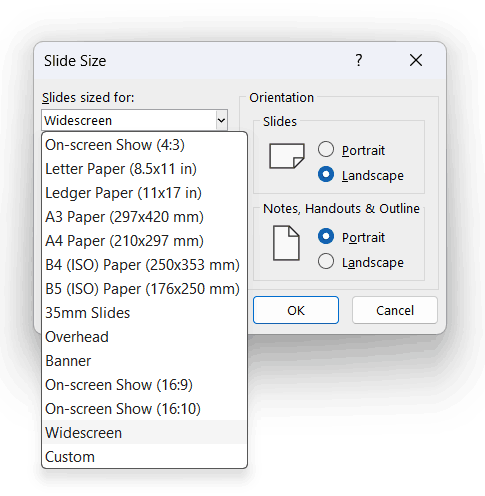
It’s fine for setting up standard sizes for projecting a presentation, creating a video or even printing a document (even that requires some fiddling due to Microsoft automatically-added margins for printer reasons).
But it’s very difficult to use it to create custom sizes for digital social media content, which need to be defined in pixels, without margins. Canva does a great job in this respect, and I quite often hear “Why can’t PowerPoint make this task easier?”.
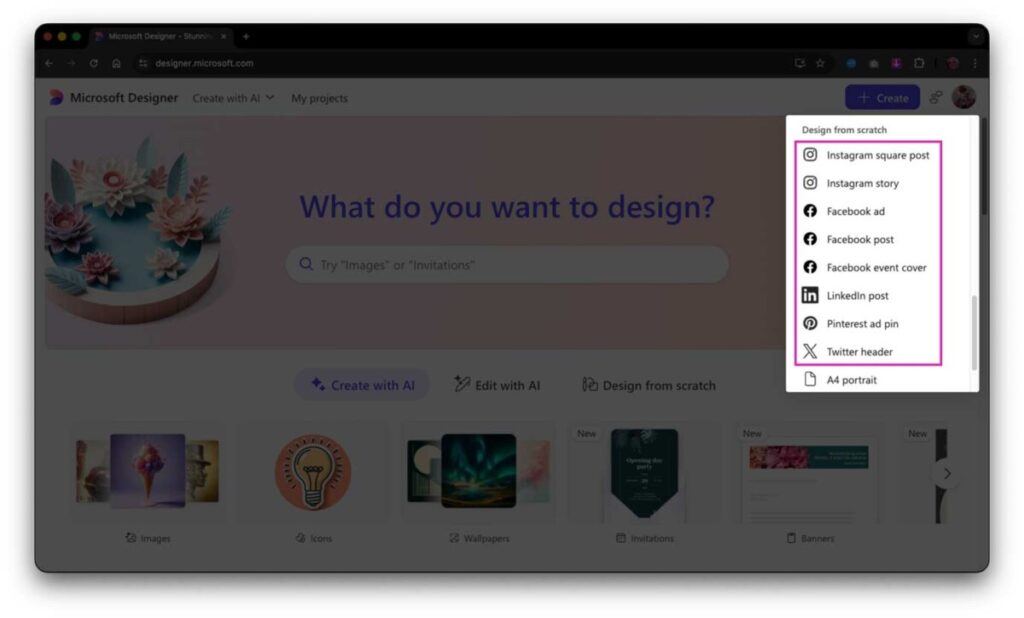
Separately, Microsoft Designer includes canvas sizes for social media:
One of the most recent requests came about as a result of a discussion between Microsoft MVPs (Most Valuable Professionals) in which Echo Swinford suggested one way to improve PowerPoint could be “… as simple as providing standard sizes for social media posts.” And that lead Nick Visscher and Ellen Finkelstein to chime in with supporting shouts of “Yes please!” plus additional use cases and suggestions. And that got me thinking…
Last but not least, we have a team of talented designers in our own marketing department at BrightCarbon and they wanted to use PowerPoint to create our LinkedIn posts because it’s super-familiar to them and ultra-fast to design compelling content.
Putting all these together made it a no-brainer to do something to help everybody achieve a common goal. The result is the Social Media Canvas add-in which creates a new tab in the backstage of PowerPoint for Windows (there’s no backstage view for macOS, hence this is a Windows-only solution for now). This new tab provides an easy way for content creators to select a canvas size for popular social media formats and then export graphics and videos at exactly the right dimensions in pixels:

Geetesh: How does this one reflect your philosophy of extending PowerPoint rather than replacing it?
Jamie: My philosophy for over two decades has always been to try and address a particular PowerPoint challenge by extending its functionality to solve a specific need. Millions of people use PowerPoint across the planet every day and many are very familiar with using it. It’s much easier to give these users new capabilities in their favourite presentation design app than try to get them to change to a different app.
Geetesh: Many people use Canva or Adobe Express for social media graphics. How does your add-in complement or differ from those tools?
Jamie: Both of those tools are excellent choices for creating social media graphics. If a designer is already using those tools to create other content types then it makes perfect sense for them to also use these apps to create their social media content. Where my add-in comes into play is for designers who are already confident in PowerPoint and are used to its capabilities in designing static graphics, animated stories or even full-on studio quality video.
To quote Microsoft, PowerPoint’s raison d’être (mission) is to “empower people and organisations to tell the world’s most compelling stories to anyone, anywhere, at an time”. This starts with a great story and a great presentation, but story telling isn’t restricted to just that medium. We’re exposed to great stories all around us, every day, in so many different media and formats. So why not use the first-created presentation design app to create your stories, in whatever format and media you want?
Geetesh: BrightCarbon has a reputation for sharing powerful free tools like BrightSlide and now Social Media Canvas. Why does the team invest time and energy into creating and giving away these add-ins — is this a kind of ‘good karma’ philosophy, or part of a bigger vision for empowering PowerPoint users?
Jamie: I may be a tad biased but I can honestly say that the culture at BrightCarbon is the best I have ever experienced in my entire career, which stretches over more than three decades. At its heart, BrightCarbon has four core values and the first of them is to “Share our knowledge and our time”. This is a quote from our employee handbook expanding on that value: “We want to rid the world of boring presentations and eLearning. We are happy to share our knowledge and our expertise – it raises our profile, hones our craft, and is the right thing to do.” The last five words of that is the reason why we decide way back in 2019 to give BrightSlide away for free.
The same philosophy remains true today and in addition to that, BrightCarbon has two Microsoft-awarded MVPs (Most Valuable Professionals). This program has a strong focus on communities and one aspect is freely providing contributions to those communities. That ambition aligns very nicely with our first core value and is another reason why BrightCarbon is happy to support me in my endeavours to bring new value to the presentation design community, at no cost to them.
You can get BrightSlide and the Social Media Canvas add-ins free from BrightCarbon. If you’re collaborating with colleagues on creating on-brand content in PowerPoint and/or Word, you may also be interested in the new BrandIn app, which is also free for up to four users. You can get that directly from within PowerPoint or Word via the Add-ins button in the Home tab or from the Microsoft Store.
The views and opinions expressed in this blog post or content are those of the authors or the interviewees and do not necessarily reflect the official policy or position of any other agency, organization, employer, or company.
Related Posts
 Jamie Garroch is a Technical Consultant at BrightCarbon, the specialist presentation and eLearning agency. He develops PowerPoint automati...
 Jamie Garroch is the founder of YOUpresent, a PowerPoint add-in and presentation design agency. YOUpresent provides a suite of...
-
Jamie Garroch is the founder of YOUpresent, a PowerPoint add-in and presentation design agency. YOUpresent provides a suite of off-the-shelf add-i...
-
Jamie Garroch is the founder of YOUpresent, a PowerPoint add-in and presentation design agency. YOUpresent provides a suite of off-the-shelf add-ins p...