
An Indezine reader asked a long time ago if one could create three circles next to each other, and make sure that they looked like this: The leftmost circle should be filled-in completely, the second circle should be half full, and the third and the rightmost circle should have no fill, to represent something that is empty. Let’s now explore how to create a visual of this sort.

Learn to create a half circle in PowerPoint 2013 for Windows.
Related Posts
 You know that Action Buttons are helpful because they at least look like buttons! But choices are limited to what PowerPoint provides – and let’s face...
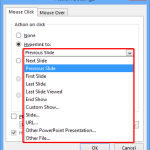 Just inserting Action Buttons on your slide is not sufficient -- you need to apply hyperlinks to them so that they have some function. You have alread...
 Once you place Action Buttons on your slide in PowerPoint 2013 for Windows, you can make them do all sorts of actions when clicked. What sets Action B...
 It is easy to flip and rotate a picture on your slide. However this same flipping can be a little tricky when you use a Picture fill within a shape. T...