
 (No Ratings Yet)
 Loading...
You animate text just the way you animate any slide object in PowerPoint. Additionally, there’s more you can do to text animation, as we shall explore in this tutorial. By default, when you animate a text placeholder or text box, all the text contained animates at one go unless your text content is within a bulleted or numbered list — in that case, all text animates as sequenced bulleted lists. Even then, the animation is sequenced to first level paragraphs (first level bullets) only — and any sub-bullet levels contained in your text placeholders or text boxes animate along with its parent level. In this tutorial you will learn how you can access some specialized options for animating paragraphs and bulleted text sequentially by words, by letters, and by paragraph levels.
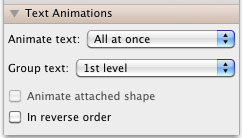
Explore the options available for text animation in PowerPoint 2011 for Mac.
Related Posts
 The Star Wars-credits style is a kind of Crawl animation. In this style, the text crawls from the bottom to the top, as it also does with Crawl. Addit...
 First of all, why would you need to highlight text? One answer could be that you want to emphasize some important words or phrases within your slide. ...
 While it is easy to change proofing language for selected text containers, that happens to be a great time waster if you need the language changed acr...
 English is spelled and pronounced differently in various parts of the world. For example, color is perfectly valid spelling in the US, but not so in t...