
 (No Ratings Yet)
 Loading...
PowerPoint 2010 ups the ante for any adjustments you make to your inserted video clips. In the previous tutorial, we have already explored how you can correct the brightness and contract for an inserted video by using the Corrections option. Other than changing the brightness and contrast values of the video, you can also completely recolor your inserted video — so you can make your full color video appear as a grayscale video, or even like a duotoned video such as blue and grayscale — or any of the other Recolor options. Do remember that the video Recolor options work almost similarly to the picture Recolor options.
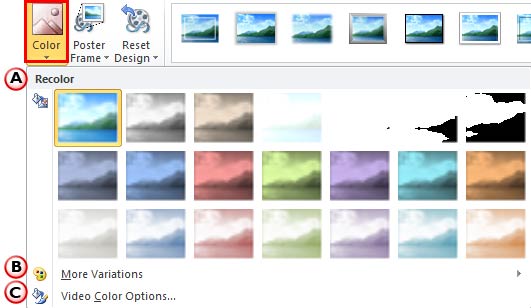
Learn about the Recolor options for videos in PowerPoint 2010 for Windows.
Related Posts
 Do you know that you can export all your presentation slides into a WMV video clip using nothing other than PowerPoint 2010? This is probably the easi...
 Do you need to keep track of the time you spend while delivering your slides? What if you are in a situation where you must give your presentation wit...
 Let's imagine you have a 3 minute video or audio clip. Exactly after the clip has played for a minute, you want some text to appear super-imposed abov...
 Microsoft has reinstated the support for YouTube videos in both PowerPoint 2010 and 2013 for Windows. You may recall that the option to insert online ...