
 (1 votes, average: 5.00 out of 5)
 Loading...
In a previous tutorial, we showed you how you can format line attributes (outlines) in PowerPoint 2003 or earlier. In this tutorial, you will learn more about the cool Patterned Lines option.

Learn how to apply patterns to lines in PowerPoint 2003 and 2002 for Windows.
Related Posts
 We previously explained how you can format a line with color, weight, and dash styles in PowerPoint 2003 and previous versions. Now, let us show you h...
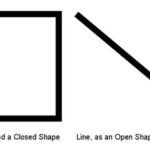 We have already covered the fill options in PowerPoint. In this series will go through the many ways in which you can format lines. The term "line" in...
 In previous tutorials, we have covered solid, gradient, texture and pattern fills for AutoShapes in PowerPoint 2003 or earlier versions. In this tutor...
 Other than solid fills and gradient fills, PowerPoint 2003 for Windows and previous versions also include three other fill types: textures, patterns, ...