
This is the print version of this page. All content is copyright Indezine.com 2000-2026.
Thoughts and impressions of happenings in the world of PowerPoint and presentations, continuously updated since 2003.
See Also:
PowerPoint and Presenting Notes
PowerPoint and Presenting Glossary

Rashmi Sinha is the co-founder and CEO of SlideShare, the world’s largest community for sharing presentations. She manages design and business development at SlideShare. Previously, she founded Uzanto, a user experience software company that worked with companies like eBay, iFilm, AAA, and Blue Shield. She also led the team that created MindCanvas, a rich online survey platform for customer research. Rashmi has a PhD in Cognitive Neuropsychology from Brown University. She did a PostDoc at UC Berkeley in Human-Computer Interaction. She blogs about social software and running a startup.
Geetesh: Three presentation contests in as many years – how has SlideShare’s World Best Presentation Contest evolved over the years?
Rashmi: The first year, it was a straightforward contest – to identify great presentations. But we realized that there were different categories of presentations and introduced categories (Tech, Education, About Me, Business, Creative / Offbeat), the second time. This time, we have new judges – people who are social media experts and understand the power of presentations as web media. And that is the focus of the contest this time: Presentations as social media.
Geetesh: Tell us about the winner?
Rashmi: The winning presentation is one of those that makes an impact on you straight away. Health care is such a complex issue. It’s really hard to get one’s head around it. Dan Roam has done a remarkable job of summarizing how health care works in America in 57 slides. It’s quite impressive.
I wish there were a series of such presentations explaining complex topics in simple terms.
Geetesh: Tell us more about the Best Acrobat Presentation subset that’s being organized as part of this contest.
Rashmi: Adobe is helping make the contest happen on a much larger scale than before. We have been able to organize it on a bigger scale, offer some great prizes for SlideShare users, all thanks to Adobe. Adobe recently introduced Acrobat 9, a new platform for creating presentations, and we wanted SlideShare users to have a chance to explore this new platform.
See Also: The World’s Best Presentation Contest 2008: Conversation with Rashmi Sinha
The views and opinions expressed in this blog post or content are those of the authors or the interviewees and do not necessarily reflect the official policy or position of any other agency, organization, employer, or company.
Filed Under:
Interviews
Tagged as: Interviews, Online Presentations, PowerPoint, Presentation Samples, Rashmi Sinha, SlideShare
Comments Off on The World’s Best Presentation Contest 2009: Conversation with Rashmi Sinha
Although SmartArt contains text, it is not too easy to edit, add, or delete text contained within a shape inside a SmartArt graphic. Thankfully, the Text Pane available to edit text in a SmartArt graphic makes it a whole lot more intuitive! This page explores options for working with the Text Pane for SmartArt graphics in PowerPoint 2007.

Filed Under:
PowerPoint 2007
Tagged as: PowerPoint 2007, SmartArt, Tutorials
Comments Off on Text Pane for SmartArt Graphics in PowerPoint 2007 for Windows

Joel Mishon is the co-founder and co-director of CartoonStock Ltd. Prior to starting the business more than 10 years ago, he was a freelance cartoonist in the UK, producing work for national titles such as Private Eye, The Times, Readers Digest, and The Spectator. He lives and works in Bath, UK.
In this conversation, Joel discusses the CartoonStock website.
Geetesh: Tell us more about CartoonStock and how the media provided by your site can be used in PowerPoint presentations.
Joel: CartoonStock is the world’s largest cartoon library that allows instant licensing and downloading of cartoons. We represent more than 500 professional cartoonists and animators from around the world and license their work to everyone from major international publishers and advertisers to private individuals and organizations for educational and presentation use. We work with artists whose work appears in well-known titles such as Reader’s Digest, The Wall Street Journal, The New Yorker, and The Times so presentation clients wishing to utilize our collection have access to some of the best cartoons and cartoonists in the world at fees that reflect the more modest usage. To license the use of a top-quality cartoon for presentations for up to a year costs just USD20. There are more than 150,000 cartoons to choose from, and they are all searchable and downloadable instantly at CartoonStock Ltd.

Cartoon used with permission from CartoonStock
CartoonStock started as a company specializing in print cartoons for publishing and presentation use. However, as the demand for more multimedia content has increased, CartoonStock now offers professional animations as well. This means that clients can enliven their presentations not just with still images but with full professional animations. Before the service existed, there was no easy, reasonably priced, legal way for clients to give presentations to gain access to this sort of material, so we are creating a new market, and hopefully providing a very useful service.
All our images are high-resolution JPEG files and animation files can be downloaded at the resolution and in the format you choose, so both can be slotted into a PowerPoint presentation in seconds.
Geetesh: About your foray into cartoon animations, how is it a win-win situation for users and creators of these animations?
Joel: Users gain access to very good quality animations for presentations. This is the sort of high-quality content they wouldn’t have had access to previously. Creating animations is a very expensive and time-consuming process that requires a great deal of talent. It would be very rare that someone could afford to commission new work from an animator, but for a small fee, they can now legally use appropriate work.
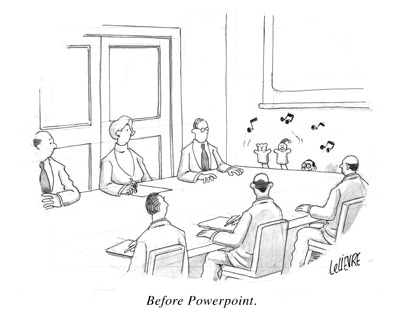
Cartoon used with permission from CartoonStock
New technology has allowed animators to create more content more quickly than they did before, but it remains a time-consuming and expensive process and the new work that has been created previously had no obvious outlet and had been hard to monetize. Animators might display it for free on sites dedicated to animation or might wait for the work to be picked up by one major media client, but with a service like CartoonStock’s they can now make lots of smaller sales rather than
The views and opinions expressed in this blog post or content are those of the authors or the interviewees and do not necessarily reflect the official policy or position of any other agency, organization, employer, or company.
Filed Under:
Interviews
Tagged as: Cartoons, Clip Media, Interviews, PowerPoint
Comments Off on CartoonStock: Conversation with Joel Mishon
In a previous tutorial, we showed you how you can insert SmartArt graphics in PowerPoint 2007. However, that approach works only when you are creating new slides. Many times, you may already have slides that contain bulleted text. This tutorial shows how you can convert such bulleted text to a SmartArt graphic in a jiffy within PowerPoint 2007.

Learn how you can convert bulleted text to a SmartArt graphic in PowerPoint 2007 for Windows.
Filed Under:
PowerPoint 2007
Tagged as: PowerPoint 2007, SmartArt, Tutorials
Comments Off on Convert Bulleted Text to SmartArt in PowerPoint 2007 for Windows
On this page you can see some samples of SmartArt created within PowerPoint 2007. Each sample has a caption that tells you the name of that particular SmartArt graphic variant.

Explore SmartArt graphic variants that you can create in PowerPoint.
Filed Under:
PowerPoint All Versions
Tagged as: PowerPoint 2007, SmartArt, Tutorials
Comments Off on Some SmartArt Samples
Microsoft and the Office logo are trademarks or registered trademarks of Microsoft Corporation in the United States and/or other countries.