
This is the print version of this page. All content is copyright Indezine.com 2000-2026.
Thoughts and impressions of happenings in the world of PowerPoint and presentations, continuously updated since 2003.
See Also:
PowerPoint and Presenting Notes
PowerPoint and Presenting Glossary

Mike Bielenberg is general manager/musician for Jupitertunes, a division of Jupitermedia Corp. He is the original founder of BBM, an online music library created for Flash, PowerPoint and web professionals. He is based in Atlanta.
Geetesh: Tell us more about RoyaltyFreeMusic and its music collection.
Mike: With over 8,000 instrumental songs and 10,000 sound effects, RoyaltyFreeMusic.com is currently the world’s largest online collection of what is called “buyout music” or “stock music”. “Royalty free” means you only pay once and can use it again and again in commercial projects.
Although our subscriptions are a great bargain, anyone and everyone can listen to the tracks in our library, use a credit card or PayPal to buy a single track, and download it in either WAV or MP3 format. Our friendly staff is available by day to help people with their purchases and choose music for them.
Geetesh: In your opinion, what genre of music works best in PowerPoint presentations?
Mike: You can never go wrong with an upbeat classical piece or an ambient electronica track. So few PowerPoint users actually employ music I think you’re already ahead of the game by having music at all (as long as it’s legal!)
But really, it’s not about genres. That’s too limiting. It’s more about tempo and emotions. Many online music libraries now let you search for music based on both tempo and/or emotion. I think that’s much more liberating than limiting yourself to just classical or techno.
If I’m watching a PowerPoint presentation, I’m there to learn something. That’s a very state of mind for me than passively watching television. So, for PowerPoint, the music really has a different job to do. It has to:
Satisfying #1 usually means picking something with a fairly brisk tempo. Satisfying #2 completely depends on your subject matter, but I find it’s usually something positive and inspiring.
The views and opinions expressed in this blog post or content are those of the authors or the interviewees and do not necessarily reflect the official policy or position of any other agency, organization, employer, or company.
Filed Under:
Interviews
Tagged as: Interviews, PowerPoint, Sounds
Comments Off on Jupitertunes: Conversation with Mike Bielenberg

Henk de Groot has been very involved in display and presentation technology. In the last 17 years, he has held various management positions at Tektronix in Europe and the USA; he led the European operation of InFocus projectors right from its startup for 9 years. He is the owner of Intelligent Lectern Systems BV and Sho-Q BV, where he developed a new presentations systems solutions that creates a product category and new levels of productivity in presenting and teaching.
Geetesh: Tell us more about your role and Sho-Q.
Henk: As CEO of Sho-Q, I am very involved in all aspects of the company, which fundamentally falls into 2 separate categories—The development of the products and working with end-users on making sure that the product has the right features and that these features can be developed into current and future versions of the products. It is the most fun I have had in years, truly making a difference and enhancing the presentation experience.
Geetesh: What things does Sho-Q do well?
Henk: We are all about enabling the presenter. PowerPoint does a great job of developing presentations. However, it does not enable the presenter or presenters to deliver a seamless presentation, especially in a multi-presentation environment. That is where Sho-Q comes in.
The software has a load of features on both the organization and the delivery side.
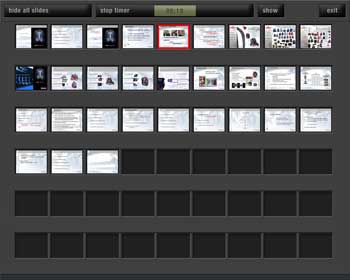
Figure 1: Show all Slides
Seamless transitions between presenters and presentations, the ability to set up Intermezzo screens so attendees don’t have to watch the whole setup process, users’ ability to walk up to a presentation device, and effortlessly using a USB Flash device run a presentation and when finished walk away with the security of knowing that their presentation is not on the machine they just used are just some of the features.
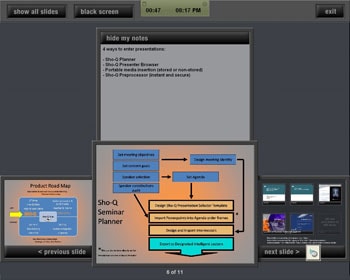
Figure 2: Presenter View

Figure 3: Selector Screen View
Additionally, users can time their presentation, see their notes, and navigate their presentation, all though a very intuitive screen that runs on a touch display. This is the first PowerPoint-enabled software application specifically written for touch displays.
So we are both a software and hardware company. We develop a complete line of touchscreen-enabled lecterns, again enabling the presenter. That is what we are all about.
The views and opinions expressed in this blog post or content are those of the authors or the interviewees and do not necessarily reflect the official policy or position of any other agency, organization, employer, or company.
Filed Under:
Interviews
Tagged as: Add-in, Interviews, PowerPoint
Comments Off on Sho-Q: Conversation with Henk de Groot
Jigsaws can add a whole new level of interest to a PowerPoint slide, especially if the jigsaw shapes are cleverly placed and animated. However easy it might be to create something like this from scratch in PowerPoint, it cannot be as easy as Jigsaw Maker, the PowerPoint add-in that we’re reviewing today.

Read the Indezine review of Jigsaw Maker 2.
Filed Under:
Add-ins
Tagged as: PowerPoint, Presentation Samples
Comments Off on Jigsaw Maker
iWork, Apple’s productivity suite, has managed to capture 16% of the Mac Office Productivity sales. This really is a fairly big achievement. Microsoft Office is a monster, everyone everywhere uses it and it is the standard for Office Productivity apps. So how have Apple managed to crack Microsoft’s dominance in this market?
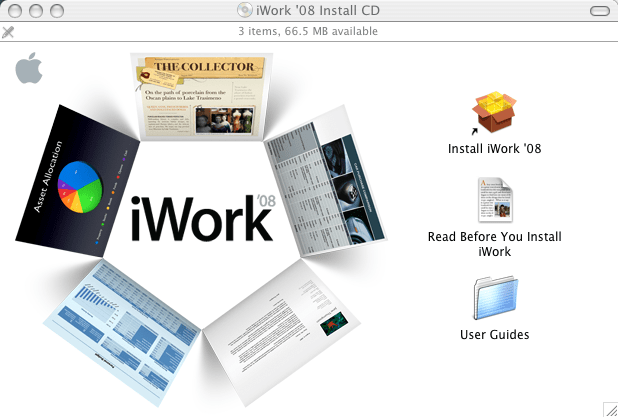
The MacApper site has more info.
Filed Under:
Microsoft Office
Tagged as: Keynote, Microsoft Office, Office for Mac, PowerPoint
Comments Off on iWork: Microsoft May be Worried
Just uploaded US Elections badges in PNG format — copy to your other PowerPoint slides as required!

Download a sample presentation containing US Elections’ badges.
Filed Under:
Presentation Bank
Tagged as: PowerPoint, Presentation Samples
Comments Off on US Elections Badges in PowerPoint
Microsoft and the Office logo are trademarks or registered trademarks of Microsoft Corporation in the United States and/or other countries.