
This is the print version of this page. All content is copyright Indezine.com 2000-2026.
Thoughts and impressions of happenings in the world of PowerPoint and presentations, continuously updated since 2003.
See Also:
PowerPoint and Presenting Notes
PowerPoint and Presenting Glossary

Jihoon Kim serves as sys-op at PowerPoint Experts Club, a popular online community for Korean PowerPoint users. Jihoon is also a Microsoft MVP for PowerPoint.
Geetesh: Tell us more about yourself and the PowerPoint Experts Club.
Jihoon: My name is Jihoon Kim. I lead the Microsoft PowerPoint Expert Club, an online community on Naver, Korea’s no.1 search portal.
Launched on December 9, 2003, our community is continuously growing with currently 210,000 members, which is regarded as the biggest knowledge community in PowerPoint area. Our PowerPoint Expert Club cafe is open not only to experts but also to anyone who’s interested in PowerPoint and who’s looking for such information. Our cafe intends to be a place where anyone can be an expert even with his little knowledge of PowerPoint and such knowledge can be shared. This is our community philosophy: virtue of sharing, and we always try to do so.
Since being awarded as a PowerPoint MVP in 2006, I’m sharing information and giving professional lectures to people who want to learn efficient business presentation skills.
Geetesh: The PowerPoint scene in Korea is very experimentive — with illustrations, movies, and games being created using PowerPoint. Can you tell us more about this?
Jihoon: You commented that the usage of PowerPoint in Korea is experimental. The reason seems to me that you saw only some of our members’ work. But it’s not the general usage in Korea.
I think there are many PowerPoint enthusiasts, because of PowerPoint’s ease in graphical presentation. And such is the case in our community. These days, there is a fair number of people who put these high-level skills to professional presentation usage. And now that PowerPoint animation has been improved next to Flash since Office XP (PowerPoint 2002), this animation is being used to captivate the distracted audience in the beginning of presentations.
Paying attention to this, we held a contest in celebration of reaching 200,000 members (maybe you saw some “experimental” works in this contest). You can see one of our experimental works on YouTube.
Also, there are some enthusiasts who create animations, games by use of high-level illustration and animation methods. But this is out of PowerPoint substance, so I don’t recommend it as leader of one of the major online communities.
The views and opinions expressed in this blog post or content are those of the authors or the interviewees and do not necessarily reflect the official policy or position of any other agency, organization, employer, or company.
Filed Under:
Interviews
Tagged as: Interviews, PowerPoint
Opazity is a new PowerPoint add-in that provides presenters and presentation designers the ability to create ‘opaque glass shapes’ without leaving PowerPoint. This effect can help hold and maintain a presentation audience’s attention by obscuring and hinting at something to be revealed.

Once Opazity is added to PowerPoint, the presenter first develops the slide and then, where the opaque glass effect is required, overlays the area with a standard or hand-drawn PowerPoint shape. With a few clicks that shape is converted into a transparent but blurred image of whatever is underneath. The presenter then applies a PowerPoint animation to the shape to reveal the image.
Opazity is compatible with PowerPoint 2007 and some earlier versions.
Read more info at the Opazity site.
Filed Under:
Add-ins
Tagged as: Add-in, PowerPoint
Comments Off on Opazity: New PowerPoint Add-in
Signage24 is a hosting service through which you can distribute your presentations as digital signage worldwide — almost like an automated billboard. This is a huge thing — and this sort of service can change the way digital signage is pushed to multiple output streams.
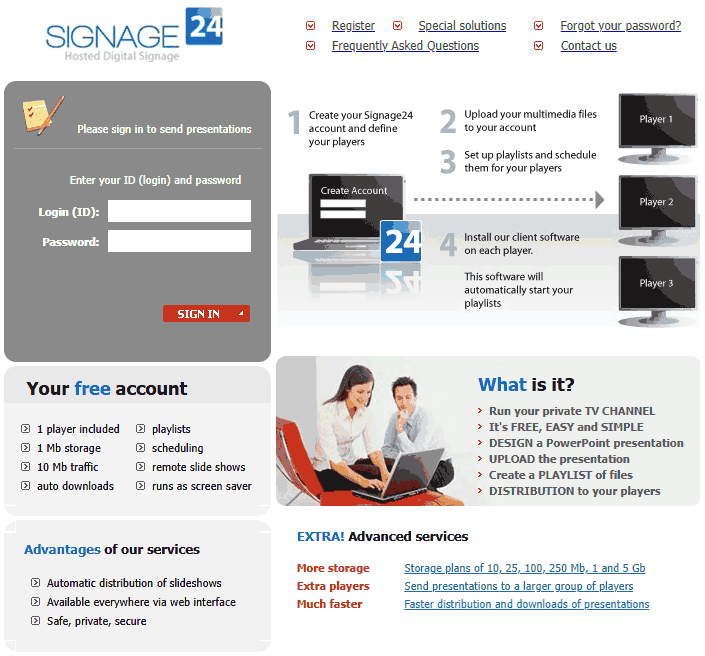
Read the Indezine review of Signage24.
Filed Under:
Companion Programs
Tagged as: Companion, PowerPoint, PresentationPoint
Comments Off on Focus on Signage24

Colby Devitt is the president and co-founder of Wildform, a multimedia software company based out of Los Angeles, USA. In this conversation, Colby discusses Wildform Online, their new online service that lets you host surveys and quizzes.
Geetesh: Tell us more about Wildform Online, and how it can help users do simple tasks.
Colby: With Wildform Online people can upload their e-learning quizzes, tests, surveys and presentations to the web and track viewership and score results without the expense and labor typically associated with using an LMS (Learning Management System). For as low as $19.99 a month, we host and track how their employees, students, customers and prospects interact with their projects.
For example, if a teacher creates a quiz, she can post it online, invite her students to take the quiz, track the test scores of her students, and if she wants, send them their results. She can choose to publish her quiz for a general audience or restrict it to just her students. Wildform Online also creates detailed reports for her – she can see how many people viewed her quiz, who took it and how they did. Wildform Online is also a great way to conduct surveys and polls – just upload your survey, invite people to take it and view the results. It’s also an effective way to host and track the results of interactive presentations and online courses.
Geetesh: How does Wildform Online integrate with other Wildform products?
Colby: Wildform Online works fantastically with our product WildPresenter Pro, which lets you create multimedia presentations, quizzes, tests, surveys, and product demos, as well as converting PowerPoint to Flash, and recording onscreen activity. It is because of WildPresenter’s quiz and survey creation capabilities that we built Wildform Online. Many of our customers created quizzes and surveys and then wanted to know how to upload them to the web and track the results from people taking them. What they were asking for typically requires an expensive and complex LMS (Learning Management System) that frequently costs in the tens of thousands of dollars. We offer this service to our customers for only $19.99 a month.
The views and opinions expressed in this blog post or content are those of the authors or the interviewees and do not necessarily reflect the official policy or position of any other agency, organization, employer, or company.
Filed Under:
Interviews
Tagged as: Colby Devitt, Interviews, PowerPoint, PowerPoint Flash, Wildform, WildPresenter
Comments Off on Wildform Online: Conversation with Colby Devitt
 Katherine Murray is the author of more than 50 books on technology and writes articles for various Microsoft sites. She also writes and edits the Microsoft Mindshare newsletter and contributes articles to CNET’s TechRepublic. In addition to books and articles, Katherine publishes BlogOffice, a blog sharing tips and ideas related to various versions of Microsoft Office.
Filed Under:
Interviews
Tagged as: Interviews, Katherine Murray, Microsoft Office, PowerPoint
Comments Off on The Katherine Murray Interview
Microsoft and the Office logo are trademarks or registered trademarks of Microsoft Corporation in the United States and/or other countries.