
This is the print version of this page. All content is copyright Indezine.com 2000-2026.
Thoughts and impressions of happenings in the world of PowerPoint and presentations, continuously updated since 2003.
See Also:
PowerPoint and Presenting Notes
PowerPoint and Presenting Glossary
It’s always interesting to see an application evolve—especially something like PowerPoint. However, it can be a problem keeping up with changes in the interfaces. We’ve just got used to the new Office 2007 interface, and another change is staring. This time it is Office 2008 on the Mac.
At times like these, it’s great to hear input from the team that creates Microsoft Office, and their explanations on why changes are made, and the logic behind these changes.
Nadyne Mielke is a User Experience Researcher at Microsoft Macintosh Business Unit, and she explains why Office 2008 will use the new Elements Gallery rather than replicate the Ribbon from Office 2007.
This is how the Elements Gallery might look like.
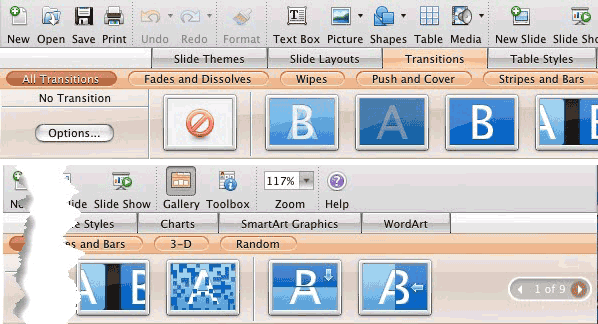
Read this on Mac Mojo, the Office for Mac team blog.
Filed Under:
Microsoft Office
Tagged as: Interface, Microsoft Office, Office for Mac, PowerPoint, PowerPoint 2008
Comments Off on Microsoft Office 2008 for Mac has the Elements Gallery
Wacom’s new Bamboo range of pen tablets is squarely targeted at mainstream users, such as business, consumer, and education markets. And they can make any Windows Vista based computer capable of all Tablet PC functions — this means you can use the ink tools while presenting with PowerPoint 2003 and 2007.
The Bamboo range works very well for digital inking, mark up, and digital notes. There are two versions of Bamboo: Bamboo, for personalized input, and Bamboo Fun for creative expression.
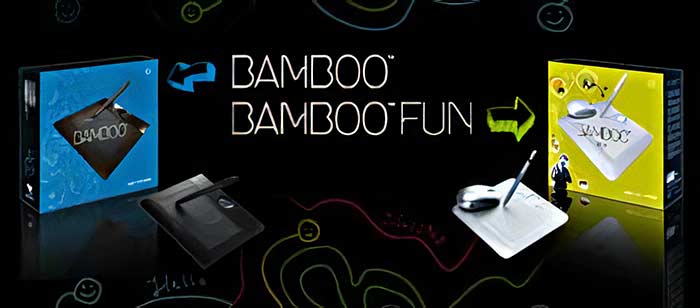
Bamboo works on both Windows and Mac platforms, and since Bamboos are more economically priced that Wacom’s other offerings, they make an excellent entry point into tablet computing.
Bamboo Fun includes Adobe Photoshop Elements, Corel Painter Essentials, and Nik Color Efex Pro.
Learn more on Wacom’s Bamboo minisite.
Filed Under:
Hardware
Tagged as: Hardware, PowerPoint, Tablet PC, Wacom
Comments Off on Focus on Wacom Bamboo
Kurt Dupont from PresentationPoint sent me this picture.

The picture shows a large video wall at a Belgian concert hall that comprises nine 50-inch plasma screens placed together. These were installed last week by a reseller of PresentationPoint. Put together, they display live Microsoft PowerPoint presentations.
Announcements and concert information are dynamically read from a database that’s sourced into PowerPoint using PresentationPoint products. The high-resolution PowerPoint presentations, optionally combined with video, can be planned with a scheduling tool.
The views and opinions expressed in this blog post or content are those of the authors or the interviewees and do not necessarily reflect the official policy or position of any other agency, organization, employer, or company.
Filed Under:
Case Studies
Tagged as: Case Studies, Digital Signage, Kurt Dupont, PowerPoint, PresentationPoint
Comments Off on PowerPoint Wall
Google upgraded its Google Docs online suite to include Presentations, an online presentation component that does try to be a little like Microsoft PowerPoint. OK, it tries to be a lot like PowerPoint, and that does not surprise us. But the question here is whether Google Presentations succeeds or not.

We’ll admit the product is snappy, intuitive, and easy to use. It works quite like a desktop application, but it does have more than a few rough edges that seem to be asking for forgiveness, since Google calls this a beta.
There are fifteen templates that look so much like PowerPoint templates from a decade ago—and there’s essential support for text and graphics. You can also import PowerPoint files.
There are no transitions, animation, or charting. That’s a whole lot missing, and we could live with that, but what were the folks at Google doing when they decided to drop out the concept of a presentation outline? Anyone who’s familiar with PowerPoint knows that the non-existence of an outline in a PowerPoint presentation can be a big reason for useless PowerPoints that are more well known to further death by PowerPoint. And that’s twice as bad to know that Google left out the outline.
Where Presentations does score over PowerPoint is in its collaborative tools. And yes, we’re sure that Google will fine-tune Presentations in the future.
Ultimately, presentation creators need to present their creations. Probably, Google’s acquisition of Tonic Systems will help in bringing out a free presentation viewer for Google Presentations. And that may be a turning point in the presentations arena.
Filed Under:
Companion Programs
Tagged as: Companion, Google, Google Slides, PowerPoint, Presentations
Comments Off on Google Unveils “Presentations”

Rhys Jeremiah has been working in IT after graduating from Bristol University with a degree in mathematics. He started writing database applications for a large insurance company and quickly moved into web development, the largest site for a major international motor manufacturer. Although now teaching mathematics, he still manages some IT work. He currently lives in Cardiff, Wales with Sarah, his wife, and their children Lloyd and Carys.
Geetesh: Rhys, tell us more about your Extract Flash product, and what inspired you to create this product.
Filed Under:
Interviews
Tagged as: Interviews, PowerPoint, PowerPoint Flash
Microsoft and the Office logo are trademarks or registered trademarks of Microsoft Corporation in the United States and/or other countries.