
This is the print version of this page. All content is copyright Indezine.com 2000-2026.
Thoughts and impressions of happenings in the world of PowerPoint and presentations, continuously updated since 2003.
See Also:
PowerPoint and Presenting Notes
PowerPoint and Presenting Glossary
Impatica Inc. announced it has entered into a channel partnership with Simply Wireless, a national provider of wireless technology for consumers and businesses. Under the terms of the agreement, Simply Wireless will offer its clients Impatica’s ShowMate based solution for PowerPoint viewing and projecting on BlackBerry handhelds. With the pocket-sized Impatica ShowMate, the BlackBerry can connect to any projector or display to present compelling PowerPoint presentations that include rich text, images, charts, graphs, animations, and slide transition effects.
We are delighted to welcome Simply Wireless to our global family of channel partners, said Michael Doyle, Chairman and CEO of Impatica Inc. Simply Wireless has a very strong presence in the mobile communications market, through a combination of direct sales force, retail outlets and online stores.

Read more on the Impatica site.
Filed Under:
Add-ins
Tagged as: Add-in, BlackBerry, Impatica, PowerPoint, Review
Comments Off on Impatica ShowMate from Simply Wireless
Tuval Software, creators of Speech-Over Studio for PowerPoint have announced Notes-Over, a new PowerPoint add-in that creates and manages formatted speaker notes coordinated with the slide contents. Not only can notes now be related to individual slides, but you can also link them to individual slide elements like shapes. In addition, you can dictate your notes and Notes-Over converts that to text.
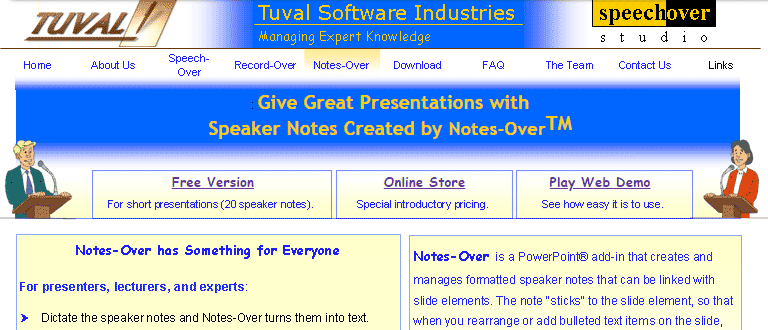
Notes-Over also includes a full-featured Notes editor. Joel Harband adds that a trial version can be downloaded from their site.
You May Also Like: An Interview with Joel Harband | Notes-Over: Conversation with Joel Harband
Filed Under:
Add-ins
Tagged as: Add-in, Joel Harband, Notes, PowerPoint, Review, Speech-Over
Comments Off on Notes-Over: New Notes Add-in for PowerPoint
We always like to think of PowerPoint as a glue that holds disparate media together. These media elements include sound, movies, pictures, clip art, and animation clips. Judiciously used, these elements can make your presentation look good, but they can also dramatically increase file sizes. Optimization software is the solution, and there are many such programs available. The newest of them all is PPTshare File Compressor. This program allows you to optimize presentations using different compression levels.
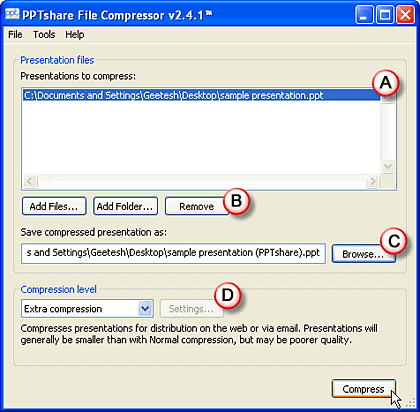
Read the Indezine review of PPTshare File Compressor.
Filed Under:
Add-ins
Tagged as: Add-in, James Ontra, PowerPoint, PPTShare, Review
Comments Off on PPTshare File Compressor

Doing so many presentations has really helped me hone my skills and I’ve noticed I get a lot more compliments on my presentations than I used to which is encouraging. Obviously, presenting is not something you ever stop learning but I thought people might be interested in my tips. Some of these really help to overcome nerves and many I just sort of discovered by accident. They aren’t really in any order except the order they came to mind. Take the best and dump the rest.
Read more on the MSDN Office Rocker site.
Filed Under:
Thoughts
Tagged as: Darren Strange, Death by PowerPoint, Opinion, Presentation Skills
Comments Off on Office Rocker on Death by PowerPoint, and Giving Better Presentations

Manuel Fernandes is from Blue Pacific Software, a rich media company based out of Lisbon, Portugal. In this conversation, Manuel discusses Blue Pacific Software and Rich Chart Live, their web-based charting product.
Geetesh: Tell us about the new save options in Rich Chart Live.
Manuel: The only tool you need to create a Rich Chart is a web browser and an Internet connection and one of the great advantages of working on the web is that you can share your work to collaborate with your co-workers or friends which is now possible with Rich Chart Live: you can save a Rich Chart project and send it to a co-worker so she can review or finish it.
One of our concerns was to keep this process really simple and familiar to a regular Internet user, so we decided that Rich Chart projects can be saved as browser bookmarks that can be transformed into local files for easy storage — there can’t be anything easier than this.
In short, we added the possibility of online collaboration when building a Rich Chart.
Geetesh: Can you share some user experiences for Rich Chart Live?
Manuel: We have a lot of university students using Rich Chart Live to do group work. They can easily share the generated charts with the rest of the group and when they finish they export it to PowerPoint to make their final presentations.
The views and opinions expressed in this blog post or content are those of the authors or the interviewees and do not necessarily reflect the official policy or position of any other agency, organization, employer, or company.
Filed Under:
Interviews
Tagged as: Add-in, Flash, Interviews, PowerPoint, PowerPoint Flash
Comments Off on Rich Chart Live Improvements: Conversation with Manuel Fernandes
Microsoft and the Office logo are trademarks or registered trademarks of Microsoft Corporation in the United States and/or other countries.