
This is the print version of this page. All content is copyright Indezine.com 2000-2026.
Thoughts and impressions of happenings in the world of PowerPoint and presentations, continuously updated since 2003.
See Also:
PowerPoint and Presenting Notes
PowerPoint and Presenting Glossary

Google isn’t yet talking about its PowerPoint killer, but a few startups, like Zoho, Structured Data, and ThinkFree, are testing products that show us what a presentation service will look like online.
A challenge with all these products is that while they will be great for users who can be online to make presentations, things change if you find yourself offline, with nothing but a laptop and a projector between you and your audience.
Rafe Needleman tells more on the CNET News site.
Filed Under:
Thoughts
Tagged as: Online Presentations, PowerPoint
 Michael Doyle is the Chairman and Chief Executive Officer Of Impatica. He has founded several successful high technology companies including Computer Innovations which became Canada’s largest personal computer sales and service organization with revenues of over one billion dollars annually.
Filed Under:
Interviews
Tagged as: Impatica, Interviews, Michael Doyle, Personalities, PowerPoint

If you have read Cliff Atkinson‘s Beyond Bullet Points book, you’ll want to look at the PowerPoint add-in he developed with NetCentrics Corporation. This add-in uses many of the principles in the book, and you get doing the same processes faster and easier.
Lisa Allen is the Product Manager for the Sociable Media PowerPoint Add-In, Getting Things Done Outlook Add-In, and other products developed by NetCentrics Corporation.
Here’s a small interview with Lisa:
Geetesh: Tell us more about the Sociable Media PowerPoint Add-In, and how the concept evolved?
Lisa: The Sociable Media PowerPoint Add-In is an add-in to PowerPoint built in collaboration with Cliff Atkinson, author of Cliff Atkinson‘s Beyond Bullet Points, and in line with his methodology. Cliff contacted us late 2004 after reviewing our other products implementing a methodology into technology and after many discussions and design meetings, we planned for a February 2005 release in line with the book publishing.
Essentially this add-in automates the concepts defined in Cliff’s approach to building PowerPoint presentations. Learn more about Cliff’s Methodology and book at Sociable Media.

Using the Sociable Media PowerPoint Add-In provides the user with a powerful tool to ensure PowerPoint presentations are more interesting and tell a story which entertains and informs. Additionally, through the Branding Toolbar, enterprises or workgroups can standardize their presentations and ensure all presentations conform to corporate identity, colors and other branding formats.
Geetesh: What can users of this add-in expect as far as improving their presentations is concerned?
Lisa: PowerPoint has become the language of business — it is how we communicate our ideas, our goals and our business objectives. Yet, often presentations are too dry, stiff and confuse the audience. Beyond Bullet Points presents a compelling case that we should create a story to communicate our ideas. Think about the last time you sat for a presentation that was full of bullet points that you
Well, the idea behind this methodology and thereby this product is that you should create points and graphical representation to engage your audience, keep their attention and most importantly, encourage your audience to take your valuable information home with them. In other words, remember what was said.
Two valuable features of the Sociable Media PowerPoint Add-In are the toolbars and the story editor, both assist in this goal. The toolbars provide new buttons and highly used PowerPoint buttons all in one location for easy access. And the story editor interfaces helps you distill your ideas and then structure them following a persuasive story model. When you are finished writing the story, you simply click a button to generate a PowerPoint storyboard that you can begin illustrating.
If you are interested in learning more about the product or even try it for free for 30 days, visit the Netcentrics site.
The views and opinions expressed in this blog post or content are those of the authors or the interviewees and do not necessarily reflect the official policy or position of any other agency, organization, employer, or company.
Filed Under:
Interviews
Tagged as: Add-in, Interviews, PowerPoint

Doug Little is from Wacom, a company that is the leader in pen enabled computing solutions. I have used Wacom products for years, and have been extremely pleased with their performance and capabilities.
In this interview, Doug tells us more about Wacom products for business applications and the use of pens and tablets within PowerPoint.
Filed Under:
Interviews
Tagged as: Interviews, PowerPoint, Tablet PC, Wacom
Vyew is a new, free browser-based conferencing and collaboration tool that’s turning heads and raising eyebrows these days. That’s because Vyew is so simple to use, Vyew provides users with a site where they can log in and interact with others in a real-time whiteboard. You don’t really need to download anything; no registration is required for basic stuff, but registration is free, and is highly recommended.
Figure 1 shows the Vyew interface. This is not the whiteboard, but the menu.
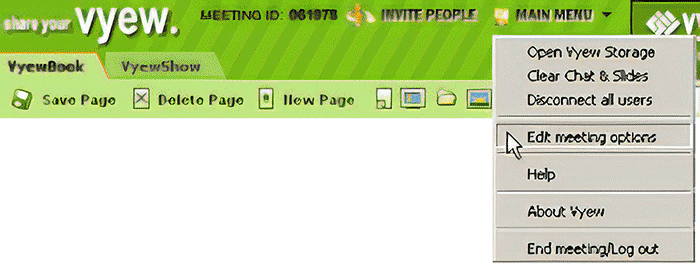
Figure 1: The Vyew Interface
For PowerPoint users who wants to use Vyew, you can upload your PowerPoint presentation onto Vyew and present in real time to up to 20 attendees. Also, each account is allocated 25MB, so you can always be ready with your meeting materials. Since typically your PowerPoint slides only cover part of the whiteboard, you can use the rest of the whiteboard for Vyew’s drawing tools, as shown in Figure 2, below. You can even use them to annotate right over the PowerPoint slides.

Figure 2: Drawing tools in Vyew
Vyew also bundles a text chat module and a phone conference option. And there’s coordinated Google search, integration with photo library sites like Yahoo! Photos, Flickr, and Kodak Gallery, and many more niceties.
We did a small interview with Fred Han of Vyew.com:
Geetesh: Fred, tell us more about yourself and Vyew?
Fred: I am the marketing and business development manager for Vyew. I started at the end of January and during that time, we have cracked the top 100,000 web sites (going from approx. 620,000 to 70,000) and have experienced a number of milestones.
Here is a brief summary of Vyew: Vyew is a free browser-based conferencing and collaboration tool. Basically, we provide users with a site, where they can log in and visually communicate their ideas through a real-time, full-featured whiteboard. No client downloads are required for either the meeting creator or attendee.
Geetesh: What motivated you to create something like Vyew? And what direction do you plan to take it.
Fred: To quote our founder, Vyew came from an idea to enhance the interactive learning experience in our SimuActive Simulation tools. These tools, which are utilized by major corporations, such as Microsoft and McAfee simulate a network environment so users can use a product in its natural environment without any setup. We began building real-time collaboration platform to support this idea — that students and instructors can train in a simulated environment in real-time. Eventually we realized that platform itself was viable outside of the e-learning space.
We plan toward fulfilling our vision and ambition of making Vyew the most broadly adopted visual communication and collaboration platform.
Thank you so much, Fred.
Do check out Vyew to learn more.
The views and opinions expressed in this blog post or content are those of the authors or the interviewees and do not necessarily reflect the official policy or position of any other agency, organization, employer, or company.
Filed Under:
Interviews
Tagged as: Conferencing, Interviews, PowerPoint, Training, Whiteboard
Microsoft and the Office logo are trademarks or registered trademarks of Microsoft Corporation in the United States and/or other countries.