
This is the print version of this page. All content is copyright Indezine.com 2000-2026.
Thoughts and impressions of happenings in the world of PowerPoint and presentations, continuously updated since 2003.
See Also:
PowerPoint and Presenting Notes
PowerPoint and Presenting Glossary
Take-off DataPoint can link Microsoft PowerPoint presentations to various data sources. You can display a presentation that is continuously updated during the show without changing the layout of the presentation. You can display text, numbers, images, graphs etc.
In this post, the Digital Producer site adds more: Take-off DataPoint is a revolution as it is the first program that offers this functionality for Microsoft PowerPoint. This feature can be used to inform your audience with live data. You can welcome visitors at your company, give directions etc. Or inform personnel about production milestones versus the current status. Or display news headlines, weather, currency exchange rates, upcoming events, sport results and much more.

Read more on the Digital Producer site.
Filed Under:
Add-ins
Tagged as: Add-in, DataPoint, PresentationPoint
Comments Off on Take-Off Releases DataPoint
PowerPoint is all about presenting to audiences. More often than not, people tend to use words rather than visuals. Using visual content such as photographs can convey so much more. In this article, we’ll look at ways to optimize your photo content before and after inserting them into PowerPoint. Among other things, we’ll also look at some photo effects you can create within PowerPoint itself.

Filed Under:
PowerPoint All Versions
Tagged as: Photos, Pictures, PowerPoint
Comments Off on Using Photographs in PowerPoint
Many of us already use Windows XP, Windows 2000 or Windows 2003 on our laptop or desktop PC. There is a very powerful feature available which most users simply are not aware about. This feature allows you to use two different displays on your PC.

Learn more about dual monitor displays on the Express Computer site.
Filed Under:
PowerPoint All Versions
Tagged as: Techniques
Comments Off on Double Monitor Display
Most of us already know that Adobe Acrobat can be used to create PDF multimedia presentations. But many people are unaware of the full range of multimedia capabilities that Acrobat offers, and mistakenly believe that Acrobat is limited to showing small video clips.
Acrobat is not a presentation-authoring program, so you’ll need to use an application like PowerPoint to create your presentation. Some people use page-layout software to create presentations, but for animated effects, PowerPoint is the easiest tool for adding motion to both text and objects.

Read more at the Planet PDF site.
Filed Under:
Companion Programs
Tagged as: Adobe Acrobat, Kiosk, PDF
Comments Off on How to Create Slide Shows and Self-running Kiosks in Acrobat
Microsoft’s new Remove Hidden Data add-in lets you remove personal or hidden data, not immediately apparent when you view your Office file within your Microsoft Office application such as PowerPoint, Word, or Excel.
With this add-in, you can permanently remove hidden and collaboration data, such as change tracking and comments, from Word 2003/XP, Excel 2003/XP, and PowerPoint 2003/XP files. When you distribute an Office document electronically, the document might contain information that you do not want to share publicly, such as information you’ve designated as “hidden” or information that allows you to collaborate on writing and editing the document with others.
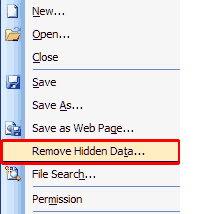
More info and download links can be found on the Microsoft site.
Filed Under:
Add-ins
Tagged as: Add-in, Microsoft, PowerPoint
Comments Off on Office 2003 and XP Add-in: Remove Hidden Data
Microsoft and the Office logo are trademarks or registered trademarks of Microsoft Corporation in the United States and/or other countries.