
This is the print version of this page. All content is copyright Indezine.com 2000-2026.
Thoughts and impressions of happenings in the world of PowerPoint and presentations, continuously updated since 2003.
See Also:
PowerPoint and Presenting Notes
PowerPoint and Presenting Glossary
Most of us already know that Adobe Acrobat can be used to create PDF multimedia presentations. But many people are unaware of the full range of multimedia capabilities that Acrobat offers, and mistakenly believe that Acrobat is limited to showing small video clips.
Acrobat is not a presentation-authoring program, so you’ll need to use an application like PowerPoint to create your presentation. Some people use page-layout software to create presentations, but for animated effects, PowerPoint is the easiest tool for adding motion to both text and objects.

Read more at the Planet PDF site.
Filed Under:
Companion Programs
Tagged as: Adobe Acrobat, Kiosk, PDF
Comments Off on How to Create Slide Shows and Self-running Kiosks in Acrobat
Microsoft’s new Remove Hidden Data add-in lets you remove personal or hidden data, not immediately apparent when you view your Office file within your Microsoft Office application such as PowerPoint, Word, or Excel.
With this add-in, you can permanently remove hidden and collaboration data, such as change tracking and comments, from Word 2003/XP, Excel 2003/XP, and PowerPoint 2003/XP files. When you distribute an Office document electronically, the document might contain information that you do not want to share publicly, such as information you’ve designated as “hidden” or information that allows you to collaborate on writing and editing the document with others.
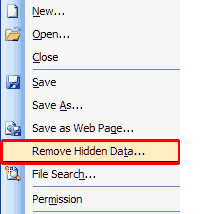
More info and download links can be found on the Microsoft site.
Filed Under:
Add-ins
Tagged as: Add-in, Microsoft, PowerPoint
Comments Off on Office 2003 and XP Add-in: Remove Hidden Data
It can be the very best friend you have, says the Santa Ana, Calif., public relations consultant.
But you have to use it right.
 Kerr’s two-sided view of Microsoft’s popular presentation and graphics program mirrors a debate coursing through business and academia. While many embrace the values of PowerPoint as a potent business tool, there are others who contend that it’s a drag on effective interaction — that it confuses, distorts, and even strangles communication.
Jeff Wuorio explains more on the Microsoft site.
Filed Under:
Thoughts
Tagged as: Jeff Wuorio, PowerPoint
Comments Off on Presenting with PowerPoint: 10 Dos and Don’ts
 This book extract from How To Do Everything with Microsoft Office PowerPoint 2003 is an Indezine exclusive with permission from McGraw-Hill/Osborne. The book itself is the ideal resource for anyone who wants to create rich presentations with PowerPoint. You’ll find out how to use all the features of the software and get coverage of key topics, such as creating a well-written outline, the fine points of graphic design, and tips for delivering the presentation in front of an audience.
Read the excerpts here
Filed Under:
Books
Tagged as: Books, Ellen Finkelstein, PowerPoint
Comments Off on Book Extract: How To Do Everything with Microsoft Office PowerPoint 2003
 Here’s an interesting post by Patti Wood, who provides the inside scoop on how to be a great and memorable speaker. She says:
Make the speech about the audience not about you, the content. or data-filled PowerPoint slides. As a presenter, face to face with an audience you have an opportunity to connect with people in a unique way. You can form a relationship with a group, with all its synergy and back and forth flow of questions and ideas. When you connect with an audience you can not only inform them but move them in a way no handout, brochure or manual can. But you must reach out and connect. If you are standing with your back towards your audience reading an endless barrage of detailed slides, you are not creating a magic relationship with your audience.
Filed Under:
Thoughts
Tagged as: Opinion, PowerPoint, Presentation Skills, Public Speaking
Comments Off on Six Trade Secrets For Great Speaking
Microsoft and the Office logo are trademarks or registered trademarks of Microsoft Corporation in the United States and/or other countries.