
This is the print version of this page. All content is copyright Indezine.com 2000-2026.
Thoughts and impressions of happenings in the world of PowerPoint and presentations, continuously updated since 2003.
See Also:
PowerPoint and Presenting Notes
PowerPoint and Presenting Glossary
I get it. Memorizing your presentation seems like a good idea. After all, every presentation you give is an opportunity for you to show off what you got in front of people that matter. Naturally, you’re planning to do everything you possibly can to reduce your risk of flopping in front of your audience, as a good presenter should.
Sadly, however, expectations don’t always meet reality.
Filed Under:
Guest Posts
Tagged as: Guest Post, Presentation Skills, Presentations, Presenting, Yousef Abu Ghaidah
Comments Off on Why You Should Never (Ever) Memorize Your Presentation
Reading view is the default view in PowerPoint for the Web. It is similar to the Slide Show view in some ways because, in both views, the slide is shown in full-screen mode. However, in Reading view, you also see the PowerPoint Title Bar and the Status Bar at the top and bottom of the interface respectively.

Learn about Reading view in PowerPoint for the Web.
You May Also Like:
Interface in PowerPoint for the Web
Presentation Gallery in PowerPoint for the Web
Open PowerPoint File from OneDrive within Desktop Application
Filed Under:
PowerPoint for the Web
Tagged as: Interface, PowerPoint for the Web, Reading View, Tutorials, View
Comments Off on Reading View in PowerPoint for the Web
Sometimes, you want to know whether you are running a 32 or 64-bit version of PowerPoint or Office. Yes, if you are running a 32-bit version of Windows, then there’s no ambiguity in the fact that you have to be running a 32-bit version of Office. But if you are running a 64-bit version of Microsoft Windows, you may be running a 32 or a 64-bit version of Office. Luckily, it’s easy to identify 32-bit or 64-bit if you know where to look.

Find out whether your PowerPoint and Office 2016 version is 32 or 64-bit.
You May Also Like: Inserting a New Slide in PowerPoint 2016 for Windows | Change Slide Layout in PowerPoint 2016 for Windows | Reuse Slides in PowerPoint 2016 for Windows
Filed Under:
PowerPoint 2016
Tagged as: Interface, Office 2016, PowerPoint 2016, Tutorials, Version
Comments Off on Identify 32-Bit or 64-Bit in PowerPoint and Office 2016 for Windows
The ZIP file that you will download contains 4 dog designs, with several fill styles applied, and also 4 dog designs with cutouts, with several fill styles applied. Plus you get 12 sample slide designs, suitable for use as Chinese New Year greeting cards, and also 12 more sample slide designs with cutouts, suitable for use as Chinese New Year greeting cards. Just copy the graphic you like and paste into another PowerPoint slide, or even a Word document or Excel worksheet. Additionally, these dog designs are vector shapes, so you can easily edit them within your Microsoft Office program by changing fills, lines, and effects or even applying Shape Styles.

Explore and download and these dog designs.
Filed Under:
Clip Media
Tagged as: Clip Media, Dogs, Graphics, Pictures, PowerPoint, Silhouettes
Comments Off on PowerPoint Shapes: Dog Designs
When PowerPoint 2016 for Mac is launched, you see the PowerPoint 2016 for Mac interface. Notice the bright orange color used for the interface. If you want, you can change the bright orange to light grey and end up with a different-looking PowerPoint program interface as explained in this tutorial.
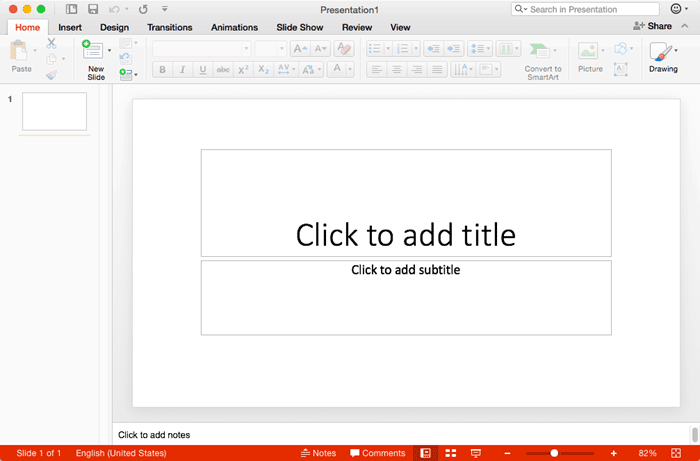
Learn how to change the interface color in PowerPoint 2016 for Mac.
You May Also Like: Ribbon and Tabs in PowerPoint 2016 for Mac | Locate PowerPoint 2016 for Mac | Set PowerPoint 2016 for Mac as the Default Version
Filed Under:
PowerPoint 2016
Tagged as: Interface, Mac, Office 2016, Office for Mac, PowerPoint 2016, PowerPoint for Mac, Tutorials
Comments Off on Changing Interface Color in PowerPoint 2016 for Mac
Microsoft and the Office logo are trademarks or registered trademarks of Microsoft Corporation in the United States and/or other countries.