
This is the print version of this page. All content is copyright Indezine.com 2000-2026.
Thoughts and impressions of happenings in the world of PowerPoint and presentations, continuously updated since 2003.
See Also:
PowerPoint and Presenting Notes
PowerPoint and Presenting Glossary
If you want to really benefit from customizing your Ribbon in PowerPoint 2016, then you’ll certainly want to add some commands that are not placed by default within any of the Ribbon tabs. Or maybe you want a particular command available on the Home tab of the Ribbon. Whatever your intent may be, you cannot place any commands within the existing groups that are built within PowerPoint. You first need to add a custom group within any of the tabs available in the Ribbon. Thereafter, you need to populate them with commands.

Learn how to add commands to custom groups in PowerPoint 2016 for Windows.
Filed Under:
PowerPoint 2016
Tagged as: Customizations, Interface, Office 2016, PowerPoint 2016, Ribbon, Tutorials
Comments Off on Adding Commands to Custom Groups in PowerPoint 2016 for Windows
We show you an interview where I was featured during the Presentation Summit in New Orleans. We then talk to Matt Gambino, who talks about his now concluded Outstanding Presentations webinar. Dale Ludwig and Greg Owen-Boger speak about their book, The Orderly Conversation is separate conversations.
We continue our tutorial series about the interface options in PowerPoint 2016 for Windows. Finally, don’t miss the new discussions and templates of this week!

Read Indezine’s PowerPoint and Presenting News.
Filed Under:
Ezine
Tagged as: Ezine, Indezine, News, PowerPoint
Comments Off on PowerPoint and Presenting News: October 20, 2015
All Ribbon tabs in PowerPoint 2016 may have any number of buttons that represent commands but they are not scattered all over the tab area. In fact, they are all neatly arranged together in Groups. Each of these Groups has a name that describes what the commands within that Group do. For example, the Slide Show tab in the Ribbon has a group named Set Up, which contains all commands that help you set up your slideshow, such as changing show settings, hiding slides, rehearsing and recording slideshows, etc.
It is only sensible to imagine that you should use this Group concept while creating your own custom Ribbon tabs. In fact, PowerPoint will not let you add any command anywhere else other than within a custom Group.

Explore working with Custom Groups within Ribbon Tabs in PowerPoint 2016 for Windows.
Filed Under:
PowerPoint 2016
Tagged as: Customizations, Interface, Office 2016, PowerPoint 2016, Ribbon, Tutorials
Comments Off on Working with Custom Groups in Ribbon Tabs in PowerPoint 2016 for Windows
Dynamic NEWS is an add-in for PowerPoint that enables you to add RSS feeds to your PowerPoint presentations. Typically, RSS feeds deliver the latest news, but, of course, you are not limited to news alone! Whatever the content of the RSS feed you choose to integrate, the moot point here is that this content can be presented and delivered right from within a PowerPoint slide. You can imagine that the possibilities to use something of this sort can be endless.

Filed Under:
Add-ins
Tagged as: Add-in, Data, News, PowerPoint, PresentationPoint, Review
Comments Off on Dynamic NEWS: The Indezine Review
The PowerPoint 2016 interface sports the Ribbon, which is tabbed. Each of these tabs contains a set of commands. By default, PowerPoint contains eight such tabs. These eight Ribbon tabs can be customized, and you can indeed add a new Ribbon tab as well.
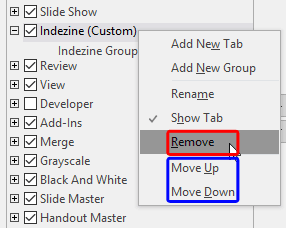
Learn how to reorder the Ribbon tabs and remove the custom tabs in PowerPoint 2016 for Windows.
Filed Under:
PowerPoint 2016
Tagged as: Customizations, Interface, Office 2016, PowerPoint 2016, Ribbon, Tutorials
Comments Off on Reordering and Removing Ribbon Tabs in PowerPoint 2016 for Windows
Microsoft and the Office logo are trademarks or registered trademarks of Microsoft Corporation in the United States and/or other countries.