
This is the print version of this page. All content is copyright Indezine.com 2000-2026.
Thoughts and impressions of happenings in the world of PowerPoint and presentations, continuously updated since 2003.
See Also:
PowerPoint and Presenting Notes
PowerPoint and Presenting Glossary

Rick Altman is a California-based presentation consultant who has been helping organizations communicate better in public since before Microsoft developed PowerPoint. He has been hosting end-user conferences since 1989, and is the host of the annual Presentation Summit, now in its 13th season.
In this conversation, Rick discusses the upcoming twelfth edition of his Presentation Summit conference, to be held in September 2015 in New Orleans.
Geetesh: Tell us more about the Presentation Summit returning to New Orleans this year?
Rick: For many of our patrons and staff, 2007 was a highlight of our entire conference experience. Just two years after Hurricane Katrina, it was more than just a conference experience. It was like a catharsis to be able to participate in breathing a bit of new life into that battered city. We were treated warmly by many of the business establishments, like heroes, and it created a unique vibe.

Except for San Diego, this will be the first time we will be returning to a city. That’s how special we think New Orleans is as a destination city. We will be in the heart of the French Quarter and our team has already found us some suitable places to go in the evenings.
Geetesh: What about the schedule itself? What can you share?
Rick: There is plenty to share, starting with the announcement of Guy Kawasaki as one of our keynote speakers. His experience and perspective on communication is incomparable and his passion and charisma are off the charts. The response to the announcement has been crazy good and I feel like a kid all over again.
As to how we got him, we share an affinity for the cloud-based graphics service, Canva, and that gave us some common ground around which to start a conversation.

Picture source: Guy Kawasaki Resources
Geetesh: Rick, can you tell us about the new 20-minute seminars and the speakers?
Rick: About the 20-minute seminars, we’re calling them our Tapas sessions, named after the small-plate style restaurants that are becoming so popular. We have found two things over the years: there are topics that would be of interest to our patrons that don’t need a full hour; and in the afternoon, people’s attention spans start to wane a bit. So, on two of our afternoons, we are replacing a one-hour time slot with a collection of shorter sessions. We think our folks will love it. Not so sure what our AV techs will think–they’ll be running around like crazy, but it should be worth it.
You will notice several new names on the speaker list. And many of them make up an interesting story. Last year, we had a wonderful influx of talented designers, attending for the first time. And they were young! Or maybe, it just seemed that way as I get older, but some of them are literally half my age. And a few of them were candid in their observations that our Design track didn’t offer enough substance for them. They loved our geek track and all the other aspects of the conference, but they wanted to see a bit more weight on the subject of good presentation design. So, I did what any breathing person would do: I hired them! Their perspective and their stories are unique, and I think they will add to our mix in a wonderful way.
I’m also excited to be bringing back Carmen Simon and Nigel Holmes, two of our most popular keynoters of all. And Garr Reynolds will make his usual live-remote appearance from his home in Japan.



What else would I like to tell people? Sign up soon. We’re going to sell out. Is that too salesy? Do I sound like a used car salesman? I’m just excited. I am. I can’t wait. I wish we could hold it this month.
The views and opinions expressed in this blog post or content are those of the authors or the interviewees and do not necessarily reflect the official policy or position of any other agency, organization, employer, or company.
Filed Under:
Events
Tagged as: Events, Interviews, PowerPoint, Presentation Summit, Rick Altman
Comments Off on Presentation Summit 2015: Conversation with Rick Altman
While it is indeed easy to spell check your entire presentation for any misspelled words, there are other options that you need to be aware of that will help checking your slides for spelling errors. Here are some tips to help you understand how you can do better proofing of your text content in PowerPoint 2013.

Explore more spelling options in PowerPoint 2013 for Windows.
Filed Under:
PowerPoint 2013
Tagged as: PowerPoint 2013, Text, Tutorials
Comments Off on Learn PowerPoint 2013 for Windows: More Spelling Options
For presentations that contain slides with too much text, or even little text — there are always chances of spelling mistakes showing up! However, you don’t necessarily have to search for these mistakes by skimming all your slides one by one since PowerPoint lets you do a spell check of the entire presentation, and make corrections as well. However there are some caveats associated with spell checking, and this does not have anything to do with PowerPoint.

Learn how to run a spell check on your entire presentation in PowerPoint 2013 for Windows.
Filed Under:
PowerPoint 2013
Tagged as: PowerPoint 2013, Text, Tutorials
Comments Off on Learn PowerPoint 2013 for Windows: Spell Check
Globes again on your slides? And why not? A globe represents so much – just adding a picture of a globe can scream “international”! And maybe that’s the problem? Maybe that’s the cliché? Maybe it would be better to use something else as a visual rather than a globe? Now these questions have “maybe” written all over them, and you really cannot expect to get simple “yes” and “no” answers, as in “yes, you can still use a globe picture”, or “no, you cannot”. Even then, we can still discuss and find solutions for ourselves – not through direct answers, but through introspection.

Learn why globe pictures can look clichéd, and what you can do to get better alternatives.
Filed Under:
Clip Media
Tagged as: Clichés, Design, Graphics, Opinion, Pictures, Presentation Skills, Visuals
Comments Off on Clichés: Globe Pictures in PowerPoint
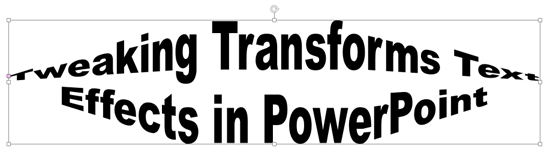
Working on a presentation creating slides that can attract attention is always a challenge. This is more challenging when you want to draw attention to a motto, a slogan or an axiom. To make such text stand apart, it is easy to apply text transform effects to your selected text. Apart from using presets, you can go further and tweak any of the presets to make your own distinctive Transform effect. In this tutorial you’ll learn how to tweak the Transform text effect in PowerPoint 2013.
Filed Under:
PowerPoint 2013
Tagged as: Effects, PowerPoint 2013, Text, Tutorials
Comments Off on Learn PowerPoint 2013 for Windows: Advanced Text Transforms
Microsoft and the Office logo are trademarks or registered trademarks of Microsoft Corporation in the United States and/or other countries.