
This is the print version of this page. All content is copyright Indezine.com 2000-2026.
Thoughts and impressions of happenings in the world of PowerPoint and presentations, continuously updated since 2003.
See Also:
PowerPoint and Presenting Notes
PowerPoint and Presenting Glossary
If you want to logically categorize your presentation slides so that they can be easily managed, then you should use the Sections option. You are not just limited to adding and renaming Sections — you can also move slides from one Section to another, or change the order of Sections, or collapse / expand Sections etc. Other than these activities, you can also remove a Section, as explained in this tutorial.
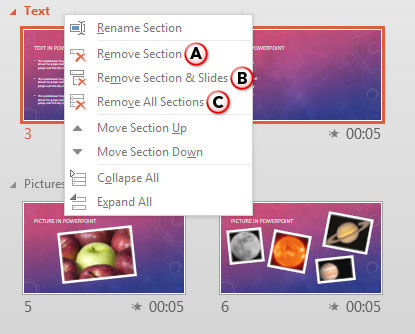
Learn how to remove Sections in PowerPoint 2013 for Windows.
Filed Under:
PowerPoint 2013
Tagged as: PowerPoint 2013, Slide Management, Tutorials
Comments Off on Learn PowerPoint 2013 for Windows: Removing Sections
Creating Sections in your presentation helps you to logically categorize your presentation slides so that you can easily manage them. Just adding and naming sections is not all that you can do. You can do more such as moving slides from one section to another, or changing the order of the sections, or collapsing / expanding sections etc. Other than these activities, you can also remove a section. This removing action itself has got few more options, as explained in this tutorial.

Learn how to remove Sections in PowerPoint 2011 for Mac.
Filed Under:
PowerPoint 2011
Tagged as: Office for Mac, PowerPoint 2011, Slide Management, Tutorials
Comments Off on Learn PowerPoint 2011 for Mac: Removing Sections
Atoms represent activity at the most minute level, and are often used to suggest agility! In this set, we bring you not one or two, but ten variations of these atoms. These atom graphics can be used on their own, or also combined with other graphics such as a human head to create a larger concept or analogy!

Download and use these shapes in your slides.
Filed Under:
Presentation Bank
Tagged as: Graphics, PowerPoint, Presentation Samples, Shapes
Comments Off on Atom Graphics for PowerPoint – 01
This time we bring you a new series of Irregular Shapes. Plus there is an exclusive conversation with Art Holden who discusses the new additions at Presenter Media, and the closure of Microsoft’s Clip Art Gallery. We also have a series of Adobe Presenter tutorials. PowerPoint 2013 for Windows users can learn about moving slides between Sections, and how they can compare and merge presentations. PowerPoint 2011 for Mac users can learn about reusing slides via drag and drop, and also about moving slides between Sections – the latter tutorial is also available for PowerPoint 2010 for Windows users. And don’t miss the new discussions and templates of this week!

Read Indezine’s PowerPoint and Presenting News.
Filed Under:
Ezine
Tagged as: Ezine, Indezine, News, PowerPoint
Comments Off on PowerPoint and Presenting News: February 24, 2015
Many applications, including PowerPoint allow you to record your voice using a connected microphone. In PowerPoint such recorded voice-overs work very well as slide narrations. However, if your connected microphone does not work using the recording options in PowerPoint or another application, then you may have to first find if the microphone hardware was detected or not by the Mac OS X. Also if detected, has it been selected for recording? In this tutorial, we will discover how you can take care of these concerns — follow these steps to learn more.

Learn how to set up a recording audio device in Mac OS X.
Filed Under:
Apple Mac OS
Tagged as: Narration, Office for Mac, PowerPoint, Sounds, Tutorials
Comments Off on Setting a Recording Audio Device in Mac OS X
Microsoft and the Office logo are trademarks or registered trademarks of Microsoft Corporation in the United States and/or other countries.