
This is the print version of this page. All content is copyright Indezine.com 2000-2026.
Thoughts and impressions of happenings in the world of PowerPoint and presentations, continuously updated since 2003.
See Also:
PowerPoint and Presenting Notes
PowerPoint and Presenting Glossary
When you create a new table in PowerPoint, you’ll see some sort of default formatting applied to it. Most probably, you’ll find that the table already has Banded rows and the Header row highlighted. While PowerPoint decides to turn on some of these Table Style Options, there are some that you can manually enable. All put together, you can play with 6 distinct Table Style Options that let you control the way through which table rows and/or columns can be made to stand apart.
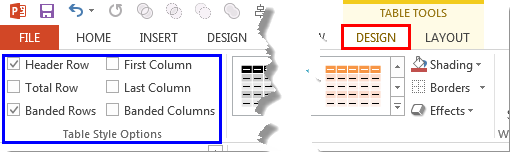
Learn about Table Style Options in PowerPoint 2013 for Windows.
Filed Under:
PowerPoint 2013
Tagged as: PowerPoint 2013, Tables, Tutorials
Comments Off on Learn PowerPoint 2013 for Windows: Table Style Options
To make far reaching changes to your slides within PowerPoint 2003, you should always consider making these changes within the Slide Master rather than within individual slides – not only will this save you a load of time, but it will also make your slides look more consistent and professional.

Learn how to edit Slide Masters in PowerPoint 2003 for Windows.
Filed Under:
PowerPoint 2003
Tagged as: PowerPoint 2003, Templates, Tutorials
Comments Off on Learn PowerPoint 2003 for Windows: Editing Slide Masters
Patterns in PowerPoint are two-color designs that include lines, dots, dashes and checks. PowerPoint includes 48 such patterns with names such as 5%, plaid, weaves, shingle, and zigzag. Pattern fills can be particularly pleasing as a fill, especially if you use a simple pattern that comprises two subtle colors. You apply a pattern fill to the Plot Area of a chart in the same way as you would apply a solid color, a gradient, a picture, or a texture fill. Follow these steps to learn more.

Learn how to apply pattern fills to the Plot Area of a chart in PowerPoint 2011 for Mac.
Filed Under:
PowerPoint 2011
Tagged as: Charting, Office for Mac, PowerPoint 2011, Tutorials
Comments Off on Learn PowerPoint 2011 for Mac: Pattern Fills for Plot Area of Charts
Microsoft Office 2010 was released on June 15, 2010. It is the successor of the previous version, Office 2007 and among the most used programs across the globe. However, after using the Office 2010 programs such as PowerPoint, Word, and Excel repeatedly — there may be times when these Office 2010 applications face some serious issues such as crashes, corrupted files, etc. And in some scenarios you may not be able to run any Office 2010 application. At this state of time you may wish to perform some magical process that will resolve the issue.

Learn how to repair PowerPoint and Office 2010 for Windows.
Filed Under:
PowerPoint 2010
Tagged as: Microsoft Office, PowerPoint 2010, Troubleshooting, Tutorials
Comments Off on Learn PowerPoint 2010 for Windows: Repair Office
Many times one diagram can form the basis of another one! A distance cartogram can double as a target diagram — or in case of what we explain in this issue — it can function well as a hot-and-cold diagram! Over to our next topic for this issue — we discuss Office Themes. Over a hundred of these have shipped as part of Microsoft Office installations but there seems to always be a different collection with each release — find out which Themes shipped with which version in our exhaustive listing. We then show you how PCB files are useful for storing and removing PowerPoint interface customizations. We also have an exclusive conversation with Noah Menikoff who discusses FlightDeck, a solution that lets you catalog and create PowerPoint slides.
PowerPoint 2013 for Windows users can learn about points, lines, and Themes. PowerPoint 2011 for Mac users can learn that there are ways in which you can make your chart Plot Area look different. And PowerPoint 2003 users will learn about PCB files. And if you are using PowerPoint 2010, learn how you can set any template or Theme as the default for new presentations.
And finally, do not miss the new discussions and templates of this week!

Read Indezine’s PowerPoint and Presenting News.
Filed Under:
Ezine
Tagged as: Ezine, Indezine, News, PowerPoint
Comments Off on PowerPoint and Presenting News: April 15, 2014
Microsoft and the Office logo are trademarks or registered trademarks of Microsoft Corporation in the United States and/or other countries.