
This is the print version of this page. All content is copyright Indezine.com 2000-2026.
Thoughts and impressions of happenings in the world of PowerPoint and presentations, continuously updated since 2003.
See Also:
PowerPoint and Presenting Notes
PowerPoint and Presenting Glossary

Rick Altman is a presentation consultant based out of Pleasanton, CA. Rick has been hosting end-user conferences since 1989, and is well known as the host of the annual Presentation Summit conference. He has a strong sense of the needs of the presentation community. Rick has authored 15 books on presentations and graphics, including Why Most PowerPoint Presentations Suck.
In this conversation, Rick discusses the third edition of his Why Most PowerPoint Presentations Suck book.
Filed Under:
Interviews
Tagged as: Books, Interviews, PowerPoint, Rick Altman
Comments Off on Why Most PowerPoint Presentations Suck 3rd Edition: Conversation with Rick Altman
You have already learned what animation is, and where you should draw the limits as far as animation goes. In addition, we looked at how you can add animation to a slide object. In this tutorial, we move further to explore the several types of animation available in PowerPoint 2011. When we say “several types”, we do not mean the animation effects themselves but the several types wherein these effects can be categorized.

Learn about the various types of animation available in PowerPoint 2011 for Mac.
Filed Under:
PowerPoint 2011
Tagged as: Animation, Office for Mac, PowerPoint 2011, Tutorials
Comments Off on Learn PowerPoint 2011 for Mac: Types of Animation
PowerPoint gets too much attention! Everyone who delivers PowerPoint presentations does more than just that — they work on Excel and other applications all the time, research data, create reports, interact with their boss, clients, subordinates, and others — and delivering a presentation is just a small part of their everyday work. Yet, how everyone else within and outside an organization looks at them is mostly perceived through their PowerPoints, and the skills they use to deliver these PowerPoint presentations. We all agree that this importance that PowerPoint gets is entirely disproportionate to its abilities! Yet, the fact is that this is so true, and matters will remain the same way for a long, long, time to come.
Filed Under:
Ezine
Tagged as: Ezine, PowerPoint
Comments Off on Indezine News: Disproportionate PowerPoint
Once you explore video editing options such as recoloring, corrections, preset video styles, video borders, video effects, resizing / flipping, etc. in PowerPoint 2010, your original video clip may appear to be entirely different from what you started with. The fact that you can make your videos look so different in PowerPoint 2010 with customizations galore can sometimes prove be a disadvantage, especially if you want to get rid of all customizations and get back to original state of your video clip. Fortunately, the Reset Design option is just what you need at this point of time! In this tutorial, you will learn how you can restore a video clip to its default appearance, and get rid of any customizations you may have made.

Learn how reset your video clips in PowerPoint 2010 for Windows.
Filed Under:
PowerPoint 2010
Tagged as: PowerPoint 2010, Tutorials, Video
Comments Off on Learn PowerPoint 2010: Reset Options for Videos
 As Executive Director, New Product Program Division, Samantha Schwartz is accountable for providing strategic oversight for all activities related to DWA product/service development from concept to post-launch analysis. This includes the planning, implementation, and maintenance of new products, including Avant Media Manager© and its supporting systems. Samantha provides leadership on both the DWA Technology Steering Committee and Corporate Project Management Division and is a primary voice of Digital Healthcare: Plugged In. Samantha has 13+ years of experience in the pharmaceutical industry, graduated from Indiana University with highest distinction and is an elected member of the prestigious Phi Beta Kappa honor society.
In this conversation, Samantha discusses DWA’s Avant Media Manager product.< Geetesh: What does Avant Media Manager do, and how can presentation designers and presenters in the healthcare industry benefit from this solution?
Samantha: Imagine this scenario—it is any given Friday evening, and there are more than 100 promotional medical presentations being given across the country. Prior to one such presentation, a healthcare marketing associate has updated the promotional slides with a critical FDA regulatory update and sent the updated slides via jump drives to 200 contracted KOLs, many of whom are speaking that evening. Once out of his hands, the associate can only hope—and possibly pray—that the KOLs (Key Opinion Leaders) will both receive and use those updated slides, because the consequences from an FDA citation could include a million+ dollar fine, having Medicare funding for his organization pulled, or, believe it or not, worse. Simply put, Avant Media Manager eliminates this gamble by providing healthcare organizations, including their contracted speakers and sales forces, content and data security, version control, consistency, and a little thing called piece of mind.
One of the cornerstones of a pharmaceutical, biotech, or medical device company’s marketing plan is educating physicians through the peer-to-peer channel by contracting KOLs to educate the wider medical professional population on a specific drug, device, and/or disease state. Within the past 10 years, we have been bending, shifting, and expanding our service offerings and support as the industry has evolved dramatically under considerable scrutiny and regulation. The foundations of our clients’ marketing plans have been significantly challenged due to a lack of content and version control in the programs these KOLs were presenting nationwide Historically, faculty would receive a PowerPoint slide set for their presentations with no reliable mechanism in place for the marketing team to communicate any changes due to FDA updates, regulatory modifications, or changes on the brand side in message, strategy, or tactics. There was significant risk of faculty using outdated slides, deleting the updated slides in order to use the old set, or attempting to modify the old set with the new changes. Because these presenters were not connected through enterprise systems, there was no way to ensure content security, version control, and consistency of brand messaging—so there was no way to guarantee the presentation would be delivered in precisely the way it was approved by legal and regulatory.
PowerPoint is an incredible tool to develop dynamic and engaging presentations; however, it lacks the enhanced insurances that organizations in the healthcare industry need in order to be 100% compliant. If a speaker—either unknowingly or with specific intent—alters the presentation in any way, it could bring the contracting organization serious penalties, including FDA citations and extraordinary fines. These concerns led DWA to develop a tool that could help our clients sleep better at night while also empowering our end users; providing a presentation management system that puts the control back in the brand marketers’ hands without jeopardizing the ability to deliver an engaging message. Hence, Avant Media Manager was born.
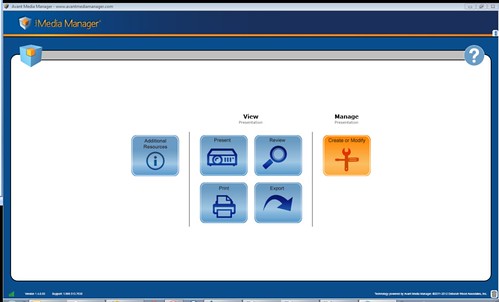
Avant Media Manager Screenshot: Home Page
Avant Media Manager is built on the Microsoft Silverlight platform, which provides several features that our clients and end users demand: online/offline access, complete content control, a rich media feature set, and a simple, PowerPoint-esque user experience. While version control and security are the backbone of our system, we have also made provisions to ensure the impact of a dynamic story (eg, brand message) and the importance of the storyteller (eg, KOL) are not sacrificed. We therefore built in a feature for presenters to customize certain portions of their presentations while remaining in compliance with regulatory and marketing parameters. This feature is managed through specific controls on the administrator’s end that allows the organization to give permissions all the way down to the individual slide level. Some of these specifications also include grouping slides together, making slides optional or mandatory, and enforcing certain slides to come before or after others. These specifications are all managed through our administrative site online and can be done in a matter of clicks.
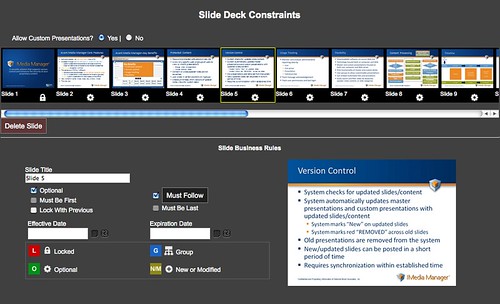
Avant Media Manager Administrator Web Site Screenshot: Setting Slide Presentation Constraints
Avant Media Manager is not an application for everyone, but it is intended for anyone needing to maintain control over their data, content, and presentations through the failsafe security measures we’ve put into place. If compliance has ever been a concern within your industry, it is worth auditing your content and making sure you are 100% confident with the solution you have in place. The back-end metrics and analytics that Avant Media Manager provides (eg, which slides are being presented, how long a user spent on each slide, when a user logged in) are worth a look in and of themselves. We also incorporate the ability to export time-stamped presentations to tablets such as the iPad (retaining the content fidelity you know and expect from your PC), off-line playback (that’s right, you do not have to be connected to the Internet!), and complete 24/7 support.
Geetesh: Tell us about your company, and your expertise in the fields of presentation design for healthcare, medicine, and other scientific industries.
Samantha: Avant Media Manager is a product of DWA Healthcare Communications Group (DWA), a recognized leader in the design, development, and dissemination of innovative medical education and creative and compliant healthcare and pharmaceutical, biotechnology, and medical device marketing strategies since 1994. Specific services include strategic marketing; global program services; relationship management; meeting planning; digital and media design; medical, scientific, and industry curriculum development; and research and analytics. As part of DWA, the Avant Media Manager team has engaged with every aspect of what goes into a medical presentation, and that industry experience gives rise to the understanding that compelling content goes nowhere without a creative vehicle for presenting and delivering it and, crucially, that our clients need to know everything about where that content goes. In terms of content creation and presentation design, the approach of our Digital and Design Solutions department is to use PowerPoint as a jumping-off platform while integrating any media elements (from high definition video to 3D animation) that aid in telling the story our clients want to tell.
We developed Avant Media Manager in part to ensure there was one application with centralized, cloud-based resources where those presentations could be managed, allowing for ultimate control over message/content without compromising its integrity. And, we did so in a way that capitalized on the unique expertise of everyone involved—media designers, compliance experts, IT experts, and account leads—so that our clients get a reliable, fully integrated, scalable, and secure onDemand solution.
The views and opinions expressed in this blog post or content are those of the authors or the interviewees and do not necessarily reflect the official policy or position of any other agency, organization, employer, or company.
Filed Under:
Interviews
Tagged as: Digital Asset Management, Interviews, Medicine, PowerPoint
Comments Off on Avant Media Manager: Conversation with Samantha Schwartz
Microsoft and the Office logo are trademarks or registered trademarks of Microsoft Corporation in the United States and/or other countries.