
This is the print version of this page. All content is copyright Indezine.com 2000-2026.
Thoughts and impressions of happenings in the world of PowerPoint and presentations, continuously updated since 2003.
See Also:
PowerPoint and Presenting Notes
PowerPoint and Presenting Glossary
Once your Photo Album presentation has been created, you may notice that the default Photo Album template is a white background with black text. And if this is what you exactly want — then you need not change a thing. But you can easily change the appearance of the slides by applying a Theme to your Photo Album presentation. You can of course do it outside the Photo Album presentation — in the normal way that you apply a Theme. But you can also apply a Theme right within the Photo Album dialog box.
Learn how to apply a Theme to your Photo Album presentation in PowerPoint 2010 for Windows.
Filed Under:
PowerPoint 2010
Tagged as: Photography, Photos, PowerPoint 2010, Tutorials

David Klein is the product director for Brainshark, Inc., leading the development of new mobile offerings, features, and applications. Brainshark’s cloud-based software lets users create online and mobile video presentations – using simple business tools like PowerPoint and the telephone – and then share and track their content. Thousands of companies use Brainshark to improve the reach and results of their business communications, while dramatically reducing costs.
In this conversation, David discusses Brainshark’s new application for Android-based smartphones and tablets.
Geetesh: Tell us more about the new Brainshark Android app, and how this strengthens Brainshark’s positioning as the foremost mobile online presentation app.

David: We’re pleased to have just launched the Brainshark App, which is available for free in the Android Market. As the workforce grows increasingly mobile, this new application helps support users of Android-based smartphones and tablets – giving them immediate and easy access to the information they need. Users get a more interactive and engaging experience when they view our online video presentations.
Providing this type of interactive, intuitive experience is a critical part of driving mobile content consumption. We all want viewers to want to engage with content, and so it’s important to make their experience as easy and convenient as possible. Using the Brainshark App, mobile viewers can navigate through presentations via a visual table of contents; answer survey, poll, and test questions; and download associated attachments. With just one click, they can share content via email or other social apps, and view our free eLearning content library as well. In addition, free myBrainshark users and Brainshark enterprise customers can log in to access their personal and company content respectively.

Overall, this application bolsters our commitment to providing users with high-impact content that can be accessed anytime, anywhere. In addition to Android, Brainshark presentations are automatically optimized for iOS (iPhone, iPad, iPod touch), BlackBerry, HP webOS, and Windows Phone 7 devices. We also have an iPhone and iPad app that, like our new Android one, provides an enhanced viewing experience.
Geetesh: What sets the Brainshark Android app apart from other similar programs, and why is Android such an important platform?
David: Through our rapid authoring capabilities, Brainshark makes it easy for sales, marketing, training, and HR professionals to create online video content, using simple business tools like PowerPoint and their phone or computer microphone. Our new app extends the power of these solutions. That is, organizations can create and deploy content within minutes that app users can then instantly and easily consume – downloading any related materials as well.
We’re particularly glad to offer these capabilities to Android users – an already popular and fast-growing segment. In fact, according to a March survey from Nielson Mobile Insights, half of all smartphone purchases in the U.S. in the last six months were Android-based devices. According to forecasts from Gartner Inc., Android will become the most popular operating system for smartphones worldwide by the end of this year – reaching a share of 49.2 percent of the smartphone market in 2012.

In addition, many newly developed tablets will have Android as their OS. The operating system has been the catalyst for an extended app ecosystem, which spans the Android Market, Amazon’s Appstore, and other online stores provided by mobile carriers and device manufacturers.
We look forward to continuing to support the Android community and other mobile users – making it easy and convenient for them to access and interact with timely and important video content.
The views and opinions expressed in this blog post or content are those of the authors or the interviewees and do not necessarily reflect the official policy or position of any other agency, organization, employer, or company.
Filed Under:
Interviews
Tagged as: Android, Brainshark, David Klein, Interviews, Online Presentations, PowerPoint
There are two types of tabs in the Media Browser — the first type comprises those tabs that show media content within some designated folders on your computer (such as the Photos, Audio, and Movies tabs). The other three tabs (Clip Art, Symbols, and Shapes) show media content that’s part of the Microsoft Office collection — in this tutorial we will explore the Clip Art tab, which provides the quick and easy way in which you can browse Office 2011’s Clip Art collection.
Learn about the Clip Art tab within the Media Browser in PowerPoint 2011 for Mac.
Filed Under:
PowerPoint 2011
Tagged as: Office for Mac, PowerPoint 2011, Tutorials
PowerPoint’s Photo Album feature is very powerful — allowing you to insert hundreds of pictures in a two or three clicks. The best part is all these pictures are editable — right down to their picture layouts, captions, etc. In fact, you can ask PowerPoint to show all pictures as black and white too — and you can also change the frame shapes of the pictures — you’ll end up with pictures that have drop shadows, or a black border, or even a picture that’s contained in a frame with rounded corners.
Filed Under:
PowerPoint 2010
Tagged as: Photography, Photos, PowerPoint 2010, Tutorials
 Michael Kolowich is founder and CEO of KnowledgeVision, which has developed enterprise-grade tools for creating, managing, and distributing synchronized interactive online video presentations for communications, marketing, training, and sales professionals.
In this discussion, Michael gives us an early look at Knovio, their new personal video presentation site. And while it’s in limited beta test, he extends an invitation to our readers.
Geetesh: Tell us about your new online presentation platform, Knovio – and what sets it apart from other similar options?
Michael: Knovio is a new free tool from KnowledgeVision that we’re sneak-previewing this week. Knovio helps people create and share online video presentations using nothing more than a webcam and a PowerPoint deck.
It’s a drop-dead-simple user interface: upload your slides, press RECORD and advance the slides as you speak, and press a SHARE button to publish instantly to email, Twitter, Facebook, or LinkedIn.
It’s different from other options in that video of the presenter is central to the experience. By capturing the presenter on a webcam, Knovio presentations give a much richer experience to the viewer.
Critical to Knovio’s success will be the fact that it’s built on KnowledgeVision’s enterprise-grade technology, which is used by some of the largest financial services, technology, and educational institutions in the world. That translates to a fast, reliable experience for even the free Knovio users.
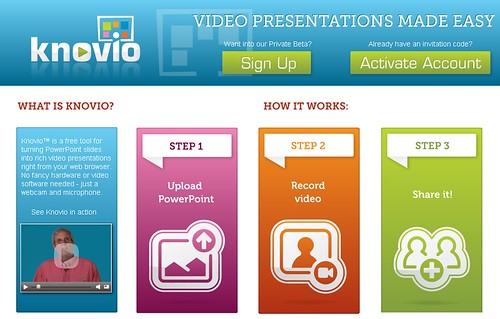
Geetesh: How does one get started with Knovio, and what is the special invitation option for Indezine readers?
Michael: Knovio is currently in an invitation-only preview phase, but we’ve made a limited number of invitations available to Indezine readers. That’s because we recognize that your readers are thought leaders in how to make better presentations.
The first 50 arrivals at Knovio who use the activation code INDEZINE will be immediately admitted to the invitation-only preview. If you don’t make it into the first 50, don’t worry: we’ll put you on a priority wait-list and you should get your invitation very soon.
Knovio is a work in progress, and we’re adding new features every few days. This is a great opportunity for Indezine readers to have a hand in helping us develop a product that suits their needs, by providing active feedback to our developers.
The views and opinions expressed in this blog post or content are those of the authors or the interviewees and do not necessarily reflect the official policy or position of any other agency, organization, employer, or company.
Filed Under:
Interviews
Tagged as: Interviews, Online Presentations, PowerPoint
Microsoft and the Office logo are trademarks or registered trademarks of Microsoft Corporation in the United States and/or other countries.