
This is the print version of this page. All content is copyright Indezine.com 2000-2026.
Thoughts and impressions of happenings in the world of PowerPoint and presentations, continuously updated since 2003.
See Also:
PowerPoint and Presenting Notes
PowerPoint and Presenting Glossary
 Heidi Jackman is the CMO of SlideRocket. Heidi is a senior Marketing professional with twenty years’ experience in high technology marketing, e-commerce, and product management. Heidi was most recently at Intuit and is recognized as one of the primary thought leaders for the online world, she created Intuit’s first “Web Center of Excellence” and played an integral role in implementing Intuit’s “web first” strategy.
In this interview, Heidi discusses the findings of an independent survey that claims a quarter of Americans would rather give up sex than sit through a PowerPoint.
Geetesh: Tell us about this survey you just did, where so many respondents preferred to give up sex rather than sit through a PowerPoint presentation.
Heidi: This survey transpired as a result of SlideRocket’s presentation revolution – where they are giving professionals the tools they need to present, engage and persuade audiences in any setting. SlideRocket’s interactive capabilities like audio, video, rich media and instant feedback capture the audience’s attention, regardless of time or location. The SlideRocket HTML5 mobile player powers stunning presentations anywhere, from any device, enabling mobile professionals to deliver the perfect pitch with smooth transitions, crystal clear videos and animations that stay true to design.
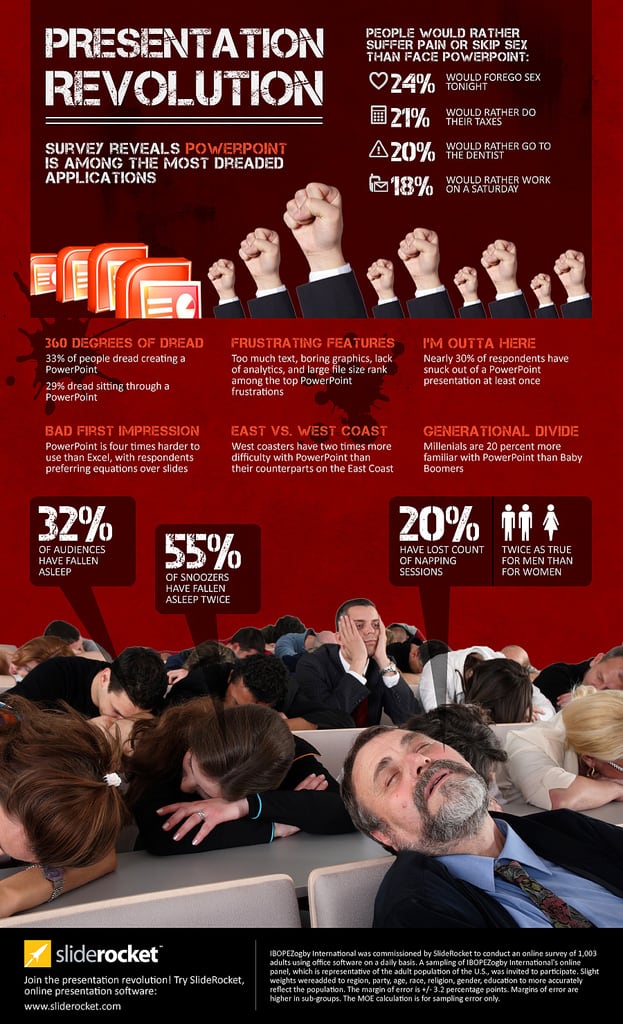
Additionally, SlideRocket’s content gallery provides inspirational presentations created by nationally renowned speakers and sales experts, ready-to-use presentations available for customization and presentation themes designed to help sales and marketing pros close the deal.
IBOPEZogby International was commissioned by SlideRocket to conduct an online survey of 1,003 adults using office software on a daily basis. A sampling of IBOPEZogby International’s online panel, which is representative of the adult population of the U.S., was invited to participate. Slight weights were added to region, party, age, race, religion, gender, education to more accurately reflect the population. The margin of error is +/- 3.2 percentage points. Margins of error are higher in sub-groups. The MOE calculation is for sampling error only.
Geetesh: Where do you think the fault lies – is it in PowerPoint as a slide format, or is it in the way PowerPoint presentations are designed?
Heidi: It’s not really PowerPoint’s fault. The reality is that PowerPoint was built 25 years ago and was not built for the current collaborative working environment or for new delivery mediums and has simply become outdated. It just doesn’t work the way that we do business today – it’s a static one-way conversation. SlideRocket, on the other hand, reimagines what a presentation program can do and brings it into the 21st century.
See Also: Nine Things You Can Do In SlideRocket That You Can’t Do In PowerPoint (link goes to Flickr)
The views and opinions expressed in this blog post or content are those of the authors or the interviewees and do not necessarily reflect the official policy or position of any other agency, organization, employer, or company.
Filed Under:
Interviews
Tagged as: Heidi Jackman, Interviews, Online Presentations, PowerPoint, SlideRocket
Like many other tasks you do in PowerPoint, inserting a new slide can be done in multiple ways. You just need to find a way that works best for you — the following steps show you how you can do this simple task in PowerPoint 2011 for Mac.
Learn how to insert a new slide in PowerPoint 2011 for Mac
Filed Under:
PowerPoint 2011
Tagged as: Office for Mac, PowerPoint 2011, Tutorials
You have already learned how to draw a parabola in PowerPoint 2010. In this tutorial you will learn how to draw a hyperbola in PowerPoint using the drawing tools available in PowerPoint 2010. So what is a hyperbola — it is essentially composed of a smooth curve that is not too different from a parabola, but this smooth curve also has a mirrored image of itself so that the finished shape looks like two infinite bows.
Learn how to draw a hyperbola in PowerPoint 2010 for Windows.
Filed Under:
PowerPoint 2010
Tagged as: Graphics, PowerPoint 2010, Shapes, Tutorials
Whenever you launch PowerPoint 2011 for Mac, you are typically presented with the PowerPoint Presentation Gallery. This gallery allows you to set all attributes of your new presentation, such as a preset Theme or template. You have many other choices to make as well, and fortunately most of these choices are optional — you will learn about all these options in this tutorial.
Learn about PowerPoint Presentation Gallery and its elements in PowerPoint 2011 for Mac.
Filed Under:
PowerPoint 2011
Tagged as: Office for Mac, PowerPoint 2011, Tutorials
Several previous tutorials have explored the different drawing tools in PowerPoint 2010 for Windows, and how they work — we have worked with line drawing tools such as line, curve, freeform, and scribble. Using these line tools, you can draw almost anything in PowerPoint that you normally draw in high-end illustration programs. In this tutorial, you will learn how you can draw a parabola in PowerPoint 2010 using some of these drawing tools.
Learn how to draw a parabola in PowerPoint 2010 for Windows.
Filed Under:
PowerPoint 2010
Tagged as: Graphics, PowerPoint 2010, Shapes, Tutorials
Microsoft and the Office logo are trademarks or registered trademarks of Microsoft Corporation in the United States and/or other countries.