
This is the print version of this page. All content is copyright Indezine.com 2000-2026.
Thoughts and impressions of happenings in the world of PowerPoint and presentations, continuously updated since 2003.
See Also:
PowerPoint and Presenting Notes
PowerPoint and Presenting Glossary
 Jim Confalone, is a partner and creative director with ProPoint Graphics and is responsible for production operations. With a fine arts background, he got his start as a designer leading the graphics department at a boutique management consulting firm in Boston, Massachussetts. Prior to ProPoint, he also worked as a web, Flash, and graphic designer in the New York area. Mr. Confalone holds an MFA with Honors in Painting and Printmaking from the Rhode Island School of Design and a BA Summa Cum Laude in Fine Arts from Amherst College.
In this conversation, Jim talks about presentation design and his clients.
Geetesh: How does presentation design for platforms like PowerPoint differ from conventional design for the web or print?
Jim: Platforms like PowerPoint and Keynote provide a unique set of requirements for designers due to the inherent variability in presenting itself. Some basic questions that help drive design are:
Ideally, designers should be forewarned and prepared for these variables before starting work so they can adjust their tactics appropriately.
It’s also important to recognize that PowerPoint presentations are generally intended to complement and support a live speaker. In contrast, print and web collateral are user-driven experiences that have relatively controllable requirements (e.g. a website must display properly in certain browsers, a print file must be designed in CMYK at a resolution suitable for printing, etc).
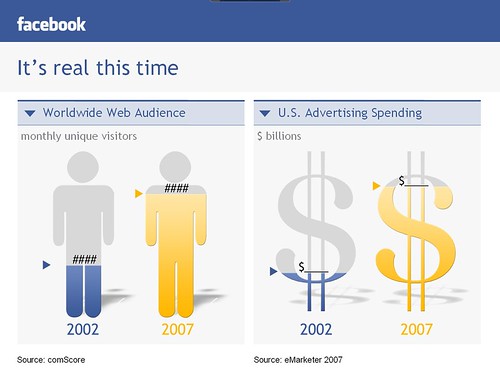
Because most live PowerPoint presentations appear in conjunction with a speaker, the designer can weed out much of the text-based content that would be redundant to what the speaker is saying. The focus should be more about distilling the speaker’s most important information and presenting it in a way that is easy to understand, adhering to the presenter’s brand, and generally avoiding unnecessary bells and whistles. You’re not designing to show off your technical prowess. Your job is to reinforce the message and brand as strongly and clearly as you possibly can. Less is absolutely more. A great example is Steve Jobs. If you watch him present, you’ll see that there is absolutely nothing extraneous to his pitches. No bullets, excessive text, needless animations, or gratuitous effects. Everything that appears on screen is finely tuned to augment his spoken message.

On a practical level, the designer must create a presentation that is flexible enough to work in a number of scenarios. For instance, the text to background contrast must be high enough that the viewer can read the content in a lit room or on a suboptimal projector. Fonts should be legible from the back of the presentation venue. Again, clarity rules. If the audience can’t see the information, the presentation is working against you.
Geetesh: Can you share some info about the type of projects and clients you work with?
Jim: ProPoint Graphics works with an extraordinarily broad range of clients. From large Fortune 500 household names to small startups, our clients come to us from virtually all industries. One reason for this is that no matter what your company does, at some point you will need to present something to somebody. Whether for a non-profit looking for funding, a CEO speaking before his board, or a supplier introducing a new product, the presentation is ubiquitous.
As far as the type of work we do, ProPoint has really made its name with a strong emphasis on high end graphic design. While our staff is completely fluent in PowerPoint, they are first and foremost great designers. When putting together a presentation we use design applications such as Photoshop and Illustrator as much as PowerPoint. It’s fairly easy to find good design shops or PowerPoint production centers, but there aren’t many companies with our particular hybrid focus.
As a result, we get a large number of sales and marketing presentations. Our clients are looking to differentiate themselves from their competitors who might be presenting a more traditional PowerPoint deck. Whether pitching an idea, product, or even yourself, you need to stand out. Your audience must walk away with a memorable impression of your message and your brand. A presentation with a good, clean, well thought out design coupled with clear and concise content will go a long way toward that end.
The views and opinions expressed in this blog post or content are those of the authors or the interviewees and do not necessarily reflect the official policy or position of any other agency, organization, employer, or company.
Filed Under:
Interviews
Tagged as: Design, Interviews, PowerPoint
Comments Off on ProPoint Graphics: Conversation with Jim Confalone
 This exclusive Indezine excerpt is from Become a PowerPoint Guru, a book that details how management and strategy consulting firms develop business presentations. The book is authored by David Tracy, who has worked as a management consultant for 12 years.
Here are couple of excerpts, reproduced here with permission from David Tracy, author of the book.
You May Also Like: Become a PowerPoint Guru: Conversation with David Tracy
Filed Under:
Books
Tagged as: Books, PowerPoint
Comments Off on Book Excerpt: Become a PowerPoint Guru

Jamie Garroch, Managing Director of GMARK Ltd., founded the company in 2009 to provide presentation professionals with software and services to alleviate the restrictions of serialized presenting. Jamie conceived the idea and has lead the development of the company’s first product for PowerPoint users, ActivePresentation Designer, which was launched in May 2010.
In this conversation, Jamie discusses ActivePresentation Designer.
Geetesh: Can you tell us more about ActivePresentation Designer, and the Menu Bar option in the product.
Jamie: The idea for ActivePresentation™ Designer came from watching sales colleagues struggle to take the right content to the right audience and deliver the right level of detail to different individuals. It became apparent that each sales person was spending huge amounts of time slicing and dicing presentation material in an attempt to predict what their customer or prospect wanted to hear, often with the result that they took the wrong set of slides or the wrong level of detail.
 I thought “wouldn’t it be great if I could deliver material to these sales folks that had everything in it they needed, for every eventuality, but they had dynamic on-the-fly control over what they presented, based on the needs of their audiences? Now that would be customer focused.” This struck me as being the same need as a web site. For many sites there are often thousands of pages but a visitor freely and rapidly navigates their way to what they want instead of being forced down a particular path.
This navigation concept is the foundation of ActivePresentation Designer, and enables a presentation author to overlay a hierarchical tree structure on top of a standard sequential PowerPoint presentation and then link this tree to the slides. Using this overlay, a Menu Bar is then created that can appear on all or some of the slides and provides multi-levelled interactive navigation across the whole presentation, during the slide show. So, it’s now possible to take 50, 100 or even more slides in a single presentation but only present the 10 or so needed in any particular session. It also means that when you send a presentation electronically, the recipient can find their topics of interest quickly.
Geetesh: Beyond the Menu Bar, ActivePresentation Designer includes several widgets to make things like adding a clock or directly printing from a slide easier – tell us more about these features.
Jamie: A second key concept is “make the presenter’s life easier so they can concentrate on great delivery”. With this in mind, the presentation author can add a clock to slides, preventing the need to look at a watch. A printer icon can also be added to print the current slide without quitting the slide show and is useful for unmanned presentations such as kiosks. To save time, an Export Wizard can be invoked when the presentation finishes which shows only the slides presented during that session and allows the presenter to deliver a customized deck for their audience. The exported deck is secured with a unique password for each audience and the export process checks the confidentiality level (set by the author at design time) of each slide before exporting it.
Another time saving feature is the Co-Branding Wizard which batch processes your presentation, creating multiple copies and ‘stamping’ each one with a logo or other image from a folder library on your PC. This benefits companies that want to deliver multiple copies of a presentation to a distributor, dealer or representative channel, each one being co-branded with the partner identity. Finally, Popups address the need to show or hide detail based on audience needs giving the presenter the ultimate control over message delivery.
See Also: ActivePresentation Designer: The Indezine Review
The views and opinions expressed in this blog post or content are those of the authors or the interviewees and do not necessarily reflect the official policy or position of any other agency, organization, employer, or company.
Filed Under:
Interviews
Tagged as: Add-in, Interviews, PowerPoint
Comments Off on ActivePresentation™ Designer: Conversation with Jamie Garroch

David Tang (Dave Tracy) has worked as a management consultant for 12 years. During this time, he worked at a number of firms, from strategy boutiques to global, full-service consultancies. His clients have included burgeoning startups to Fortune 50 corporations, spanning North America, Europe, and Asia; and across a number of industries, including high-tech, consumer products, life sciences, entertainment, and telecommunications.
In this conversation, David talks about his Become a PowerPoint Guru e-book and more.
Geetesh: Tell us more about your approach to creating presentations that you explain in your e-book.
David: Sure. The approach discussed in my book details how management and strategy consulting firms develop business presentations. This approach covers two topics:
Regarding the first topic, storyboarding is the process used by consultants to weave a cohesive story through a presentation. This process leverages frameworks like Minto’s Pyramid and the MECE Principle. On a high level, the methodology begins by gathering your information and structuring it into a hierarchy of key statements, supporting statements, and sub-points. Based on the horizontal and vertical relationships within your story, it is then translated into a business presentation.
Regarding the second topic of slide design, management consultants use a fairly extensive set of guidelines to create slides that are both rich in content and aesthetically appealing. These guidelines begin with the Consulting Presentation Framework, which includes specific rules for grammar, font faces, and font sizes. This ensures the overall presentation has a consistent look and feel.
These guidelines also govern how one should present qualitative information, quantitative data, and for different types of audiences and stakeholders. For instance, these guidelines will address the following questions. When depicting correlation, what types of charts do I have at my disposal? Is it better to use a scatter plot, bubble chart, or even a radar diagram?
Geetesh: How do the slides created by business consulting firms like McKinsey or Deloitte differ from those created by other enterprise users?
David: Foremost, it is important to mention the final product delivered by a consulting firm like McKinsey is often a PowerPoint presentation. Therefore, it is absolutely imperative for this document to be perfect (or as close to perfection as possible). It needs to justify the high price clients end up paying!
As such, consulting firms have invested tremendous effort and money in developing practices and tools related to presentation development. When you take a typical McKinsey slide versus a general business slide, you will undoubtedly notice a stark contrast in look. Here are 3 of the more obvious differences.
A consultant will introduce the slide with a 1- to 2-line sentence. An enterprise user will use a short phrase instead, e.g., “Pros and Cons of Social Media.”
No real estate is wasted on a consultant’s slide. It generally contains both qualitative and quantitative information, displayed in one or more diagrams, and presented with some top-down or left-to-right flow. The consultant’s presentation is designed as a standalone document that can be distributed throughout an organization. An enterprise user slide usually has sparsely placed content (e.g. 3-5 bulleted sentences). A key resulting difference is the enterprise user presentation cannot exist as a true standalone document. Rather, it requires a companion verbal track to ensure the audience receives the intended take-away from the slide.
If you skim through a consultant’s presentation, the look and feel remains consistent. This is because they follow specific guidelines for font face, font size, colors, positioning, diagrams, techniques, etc. For instance, content is sourced at the bottom left of the slide in Arial size 10. Most presentations created by enterprise users lack this consistency. For instance, as you go from slide to slide, you will notice the slide titles vary in font size.
You May Also Like: Book Excerpt: Become a PowerPoint Guru
The views and opinions expressed in this blog post or content are those of the authors or the interviewees and do not necessarily reflect the official policy or position of any other agency, organization, employer, or company.
Filed Under:
Interviews
Tagged as: Books, David Tang, Design, Interviews, Opinion, PowerPoint
Comments Off on Become a PowerPoint Guru: Conversation with David Tang
This animated box is a square with a small glowing sphere that animates all four sides of the box separately uisng four each of wipe and motion path animations. Works great in PowerPoint 2007, but in PowerPoint 2010 the same animations happen a little faster! You can format the sphere and the lines as you want and the animations will still work — download and use it in your presentations. For a nice effect, add a text box right in the middle of the square, and animate it to come after the square has already been animated.


Filed Under:
Presentation Bank
Tagged as: Animation, PowerPoint, Presentation Samples, Shapes
Comments Off on Concept Slides: Animated Box
Microsoft and the Office logo are trademarks or registered trademarks of Microsoft Corporation in the United States and/or other countries.