
Apart from selecting one of the twelve default slide Background Styles available in PowerPoint 2011, you can also change the default slide background to something else such as another solid color or gradient, a pattern or a texture, or, even a picture. In this tutorial, you will learn about these options, that can be accessed within the Format Background dialog box. All these options can be used to change the look of the slide background in PowerPoint.

Learn about different options available to format the slide background in PowerPoint 2011 for Mac.
Related Posts
 The Remove Background option is among PowerPoint's newest and most wonderful abilities. It lets you remove the background from an inserted picture -- ...
 We already showed you how to remove the background from an inserted picture in PowerPoint 2011 for Mac -- this process works great for simple pictures...
 It's true that picture backgrounds add value to your presentations. Yet, one of the worst things that you can do to your PowerPoint presentation is to...
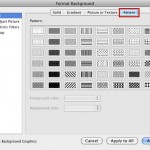 Pattern fills are the last of the various fill options for slide backgrounds we have explored to use in PowerPoint 2011 for Mac. Patterns in PowerPoin...