
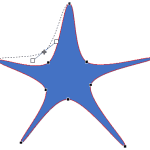
The Edit Points option gives you control over how you want a shape to look, but sometimes you might find it difficult to edit a certain segment in a shape because there are no points available to manipulate. Conversely, there could be far too many points! PowerPoint provides a simple solution for this problem: you can add and delete vertexes from a shape.

Learn how to add or delete points (vertexes) for a shape in PowerPoint 2016 for Windows.
Related Posts
 A line (outline) in PowerPoint contains both points and segments. It is easy to understand the relationship between points and segments using a connec...
 The Shapes gallery in PowerPoint consists of various shapes, both open and closed. Closed shapes are ones that do not have a “visible” beginning or an...
 Every shape in PowerPoint is created using both points and segments. Points, also known as vertexes are pronounced areas of the shape, and segments ar...
 When a shape is inserted into a PowerPoint slide, its default appearance is related to the points that it contains. Alter the points, and you can chan...