
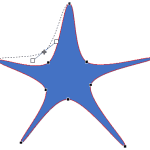
A line (outline) in PowerPoint contains both points and segments. It is easy to understand the relationship between points and segments using a connect-the-dots analogy. The points represent the dots whereas the segments represent the lines you draw between the dots. Among points and segments, we have already explored the types of points in PowerPoint 2016. We now explore the two types of Segments in PowerPoint 2016: Straight and Curved. Segments can be edited, and you can also convert a straight segment to a curved segment and vice versa, as you will learn in this tutorial.

Learn about Curved and Straight line segments within PowerPoint 2016 for Windows.
Related Posts
 The Edit Points option gives you control over how you want a shape to look, but sometimes you might find it difficult to edit a certain segment in a s...
 The Shapes gallery in PowerPoint consists of various shapes, both open and closed. Closed shapes are ones that do not have a “visible” beginning or an...
 Every shape in PowerPoint is created using both points and segments. Points, also known as vertexes are pronounced areas of the shape, and segments ar...
 When a shape is inserted into a PowerPoint slide, its default appearance is related to the points that it contains. Alter the points, and you can chan...