
 (No Ratings Yet)
 Loading...
Once you add multiple connectors that emanate from a Decision shape, you need to help your users decide where they branch their thought or work processes within the flowchart. This is typically done by adding a Yes or No caption to the connectors that output from a Decision shape. Depending upon whether the user’s answer is Yes or No, they will decide which shape they need to move towards next within the flowchart — the Yes and No captions can be easily added by inserting individual text boxes.
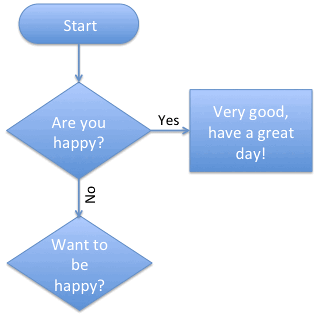
Learn about formatting connectors within flowcharts in Microsoft Office for Mac.
Related Posts
 While you can create flowcharts of all types in Microsoft Office applications quite easily using techniques explained in our Basic Flowcharts in Micro...
 Connectors are lines that link different flowchart shapes (or any shapes you place within your Microsoft Office documents). They are different from co...
 Many dedicated programs do only flowcharts, and although Microsoft creates another program called Visio for Windows users that's more flowchart savvy ...
 Before we begin, let us make it clear that this tutorial is primarily for those people who have more than one version of PowerPoint installed on their...