
Do you have a secret slide with useful information that you would rather not delete? But what if you show this slide to your audience inadvertently? How do you cope with this problem? The solution is easy: you just hide the slide. Hidden slides don’t show up in Slide Show view, but they are still available to edit and to possibly unhide when you are ready to show that slide to the world.
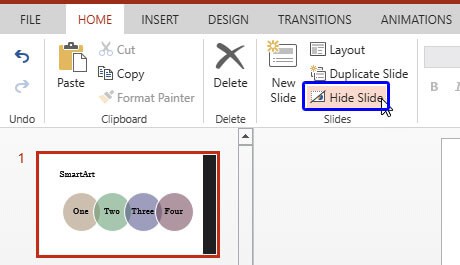
Learn to hide and unhide slides in PowerPoint for the Web.
Related Posts
 Duplicating slides is a task that can be helpful, yet its value is not always understood. The first question asked is why would anyone want to duplica...
 Like many other tasks you do in PowerPoint, inserting a new slide can be done in multiple ways. You just need to find a way that works best for you. T...
 Ever created a slide that you just couldn’t delete? It’s like a “just-in-case” drawer in your presentation. You may not use it often, but you know it ...
 Not everyone sees colors the same way! If your slides rely only on color to show meaning, some people might miss the message entirely! On this page, w...